Understanding/Showing 4-Bit Binary Addition Using a 7 Segment Display
by Simtim23 in Circuits > Arduino
91 Views, 2 Favorites, 0 Comments
Understanding/Showing 4-Bit Binary Addition Using a 7 Segment Display

In this project I built a binary adder that takes two 4 bit numbers (From DIP switches) adds them together and shows the sum in decimal on two 7 segment displays. So for the Ardunio uno it reads the 5 output bits of the adder (4 sum bits plus carry) and converts that binary sum into a decimal number. The Arduino then drives two 7447 BCD to a 7 segment decoder to light up the correct values. As a cool add on i wired up an RGB LED (pins 12=red, 13=green, 7=blue) so it cycles through colors while the Arduino runs. This turned out to be a great way to see digital logic (the adder chip) and microcontroller code working together in one project
Materials
Click on the title of the components to order them
Arduino Uno: to read inputs and drive outputs also use the software to write all code $39.00
4 bit Adder: logic gates (2 XOR, 2 AND, 1 OR chips) to sum two 4-bit values Combined $4.00
DIP Switches: two 4 position DIP switches (one per 4 bit number input) $2.50
10k resistors: eight of these for pull up resistors on the DIP switches (one per line) $1.00
Two 7447 BCD to 7 segment decoders: (for common anode displays). Each 7447 takes a 4 bit BCD input (0 to 9) and lights the 7 segment display $3.00
Two 7 segment displays: common anode type to match the 7447 and to show the tens and ones digit of the sum $6.00
Resistors for LEDs: 1k and 500 om resistors for the 7-seg segment dispaly (1k) and one each for the RGB legs of the RGB LED (500 oms) $1.50
RGB LED: common anode or common cathode but for this project i used a common cathode ( IMPORTANT IF YOU DECIDE TO USE COMMON ANODE RGB LED PLEASE REFFER TO THE CODE SINCE ALL YOU INPUTS WOULD BE THE OPPOSITE!) $1.50
2 or 3 FULL Breadboards and A LOT of wires: to wire it all together $20.00
*While LEDs are not needed for this project it's recommended you have at the very least a total of 5 to test the output of your adder*
TOTAL COST ABOUT: $78.50
Heres the Full Schematic and a Thinkercad Circuit
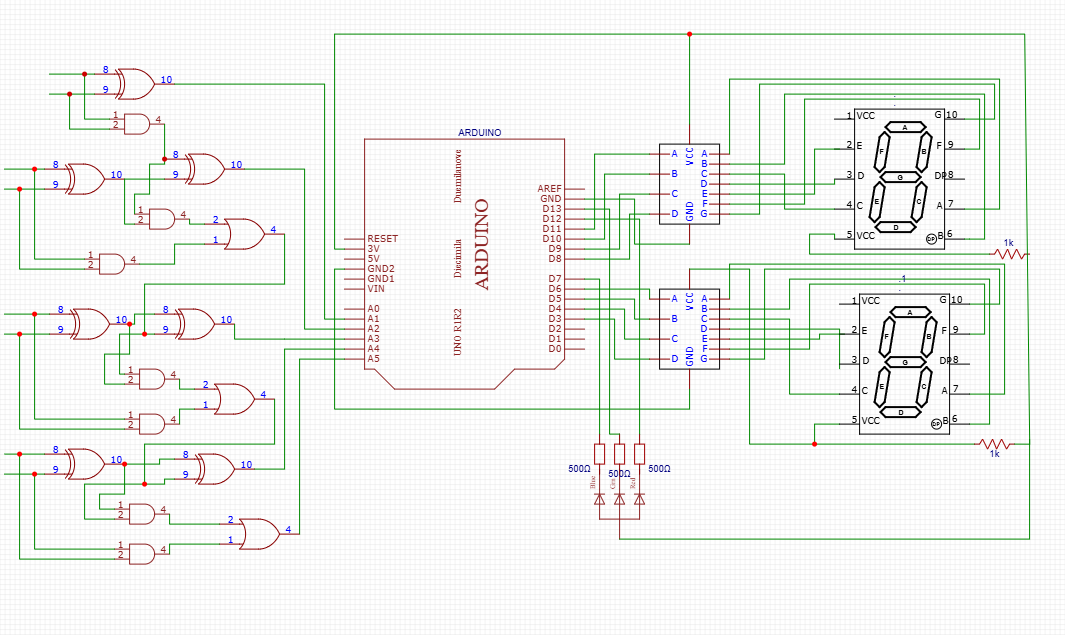
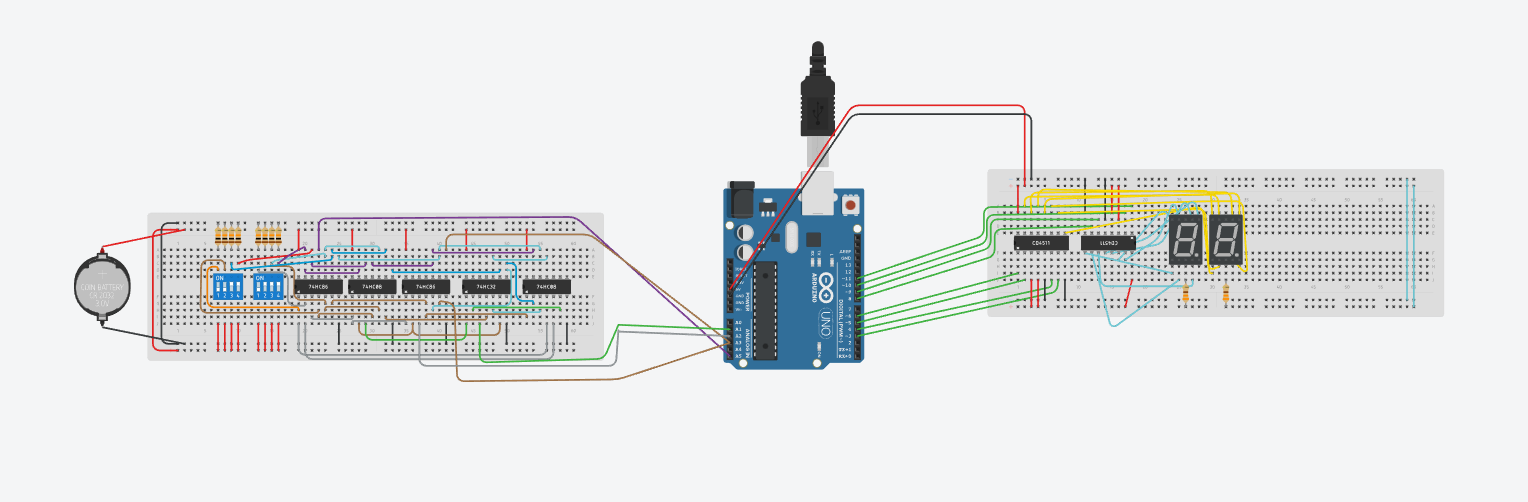
This diagram made on EASYEDA shows the overall wiring. Each of the eight DIP switch outputs (two 4-bit numbers) goes into a 4 bit adder. The adder’s 4 sum outputs plus carry-out (up to 5 bits total) connect to Arduino analog inputs. The Arduino reads those bits and computes the decimal sum. It then sends two 4 bit BCD values to the two 7447 decoder ICs one decoder drives the “ones” display and the other drives the “tens” display (needed because the Arduino alone doesn’t have enough pins to drive all segments by itself). I also wired an RGB LED to pins 12, 13, and 7 . The diagram shows the DIP switches with 10k resistors to a power supply of 5V (this ensures a HIGH or LOW on each switch output)
Its recommend to do a quick Thinkercad Circuit to Troobleshoot Faster before u can start wiring
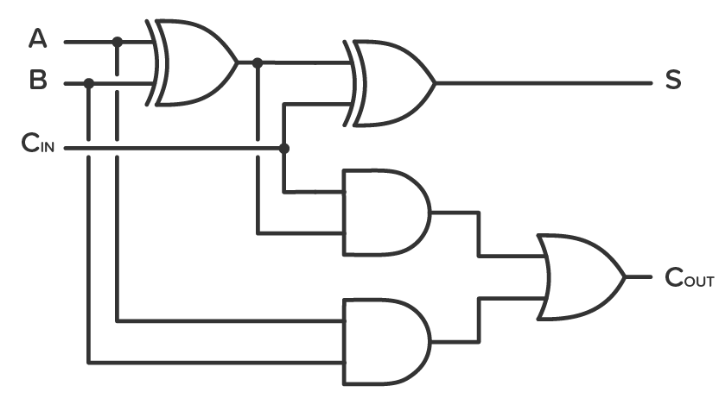
Here is A 4 bit adder you can wire from if you are having trouble
Understanding the Theory of Binary Addition and Building It


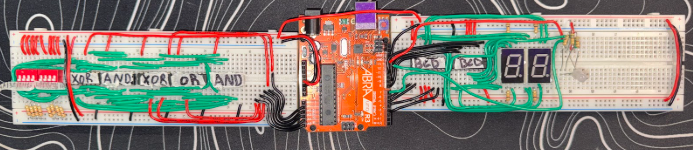
The first step in this project is planing and building building the 4 bit adder but before actually wiring or anything it was important to plan the full layout (recommend thinkercad). Since there is limited space on one breadboard planning ahead helps avoid running out of room or crossing wires. I used Tinkercad to plan where everything would go before building it in real life. When building the adder it was done one bit at a time instead of all at once. After finishing each bit i tested it using LEDs. This made troubleshooting much easier because if something didn’t work i could fix it right away instead of trying to debug the whole circuit at the end witch happens all the time. A 4 bit adder is basically an extension of a half/smaller adder where each new bit repeats the same logic gates as the previous one except for the first bit which has no carry coming in. The DIP switches were used for inputs and 10k resistors were added resistors to make sure each switch always had a HIGH or LOW value to then input it into the Arduino.
Binary addition works almost the same way as normal math would and that we learned in school. In numbers you add from right to left and if the number gets too big you carry over to the next column. Binary does the same thing but it only uses 0 and 1. When you add 1 plus 1 in binary the result is 2, but since binary doesn’t have the number 2 it becomes 10. This means the sum is 0 and a carry of 1 is sent to the next bit. A basic binary adder takes two inputs and gives two outputs: one output is the sum and the other is the carry. Logic gates like XOR and AND are used to make this happen.
To add bigger binary numbers full adders are connected together. A full adder adds two bits plus a carry from the previous bit. It then gives a new sum and a new carry. When multiple full adders are connected in a row, it is called a ripple carry adder. The carry moves from one bit to the next starting from the right side and going left. In this project four full adders are connected to make a 4 bit adder. Each adder passes its carry to the next one which allows larger binary numbers to be added correctly then onto the 7 segment display for a baseten display.
My Completed 4-bit Adder
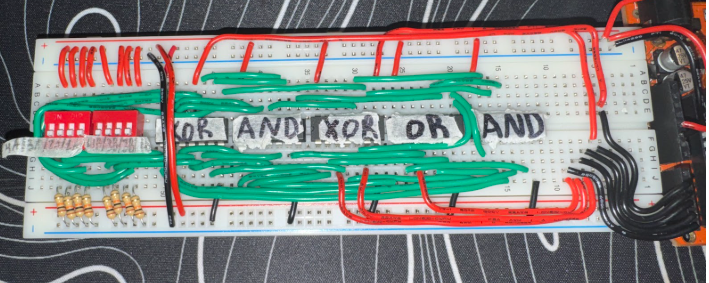
Once you are 100 percent sure that your 4 bit adder works we can move onto seeting up the 7 segment display
Coding
Shown above is the code used for this project. The exact pin numbers may be different for other builds jsut depends on you but most of the logic stays the same. The Arduino uses the voltage coming from pins A1 to A5 which are connected to the outputs of the 4 bit adder. Each pin represents one bit of the binary result. By reading these voltages the Arduino figures out the final number in base ten to then dispaly on the 7 seg
First, the analog input pins are read and stored as integer variables. Each variable represents a specific place value in the binary number. For example, the right most output of the adder represents the 1s , the next one represents the 2s , then 4s, 8s, and finally the carry bit which represents 16. The values read by analogRead() range from 0 to 1023 so each value is multiplied by (5.0 times 1023) to turn it into an actual voltage between 0 volts and 5 volts. These voltage values are stored as float variables.
Next an integer variable called baseten is created and set to 0. This variable will hold the final decimal value of the adder. A series of simple if statements are then used. If a voltage is greater than 0 that bit is considered ON. Here is an example, if the voltage for the 1s place is greater than 0, 1 is added to baseten. If the voltage for the 2s place is greater than 0 and 2 is added etc. This continues for all five bits. By the end of this the binary number has been fully converted into a base ten value and dispalyed. To make sure the conversion was working correctly, the value of baseten was printed to the Serial Monitor using Serial.println(baseten). Different switch combinations were tested to confirm that the binary input matched the decimal output and try it for yourself press on the serial monitor to check if your outputs are correct. After the base ten value is found it is split into ones and tens digits. This is so the number can be shown on two separate 7 segment displays. The ones digit is sent to one 7447 decoder, and the tens digit is sent to the other one beside it. The Arduino controls the decoders by setting their input pins HIGH or LOW depending on the number. The BCD 7447 chips then handle lighting the correct segments on the displays.
Finally, an RGB LED is added as a small extra feature. The LED is connected to digital pins 12, 13, and 7. At the end of each loop, the Arduino turns on red, then green, then blue, with short delays in between. This does not affect the math or the displays, but it shows that the program is running and i just thought it would add a nice feature to the project.
Setting Up the Display and Understanding How It Works

I used two 7447 BCD to 7 segment decoder chips. Each decoder can only handle a 4 bit input which means it can display only one digit (0 to9) at a time. Since the output of a 4 bit adder can be a two digit number, two decoders are needed and one for the ones place and one for the tens place. The Arduino is used to split the final base ten value into these two digits and send them separately to each decoder. Another reason the Arduino is used is because it does not have enough pins to directly control every segment of the displays. Using the Arduino together with the 7447 chips keeps the wiring simpler and more organized. Tutorials showing how to connect a 7447 to a 7 segment display were helpful to me and can be found on youtube.
Before building the circuit I researched the main components to understand how they work. The 7447 chip is a BCD to 7 segment decoder which means it takes a binary input and turns on the correct segments to display a decimal number. For example to display the number 2 the input to the chip would be 0010. Using this chip is very useful because without it the Arduino would need many more pins and you would need lots of wiring with nobody wants since this poreject is covered with wires. The extra control pins on the 7447 like as lamp test and blanking are mainly used for testing or turning the display off so jsut connect them to power.
A 7 s egment display is a common device used to show numbers from 0 to 9. It is made up of seven LED segments arranged so that different numbers can be formed by turning certain segments on or off. These segments are usually labeled A through G . For this project a common anode 7-segment display will be used. In a common anode display all the positive terminals are connected together and tied to 5 volt through resistors. The decoder chip then controls the display by pulling the segment lines LOW to turn them on. The picture above shows how it should look like.
Challages I Went Through That You May Come Upon
As expected there were a few problems. First connecting all the wires got messy and very confusing due to how much wiring is neeeded. I had to make a plan (using Tinkercad helped) so I didn’t mix up the DIP switches adder outputs, and Arduino pins. At first, I forgot the resistors on the DIP switches so the inputs were floating . Then adding 10k oms resistors fixed it.
Getting the code right was tricky too. I tried reading the analog pins and adding the numbers, but there were some bugs. For example, I didnt know that Arduino analog readings (0–1023) need to be turned into voltages. Using voltage = analogRead(pin) and (5.0/1023.0) helped me detect HIGH and LOW correctly. Splitting the sum into tens and ones also took a little time and help but an if/else check for sum < 10 or sum >= 10 help and fixed.
Wiring the 7447 decoders was a bit confusing at first. I had to check the logic gate pin layout to make sure each pin was connected to the correct HIGH or LOW. I labeled each pin as 1a/2a/3a/4a and the same for the other side it was easier to know which Arduino pin controls which bit. After that the display worked .
Finally i almost burned out a segment of the 7 segment display before remembering to put resistors on each line. Once I added 1k om resistors to all the segments the numbers were bright. And make sure your wiring is as neat as you can get it I tried my best lol.
Done!
 Arduino Project tutorial in description)
Heres a video of the circuit working and the ardunio code bellow if you have any questions let me know thanks!