Standalone Alarm With PIR Sensor and Responsive RGB Strip
by newlanx in Circuits > Arduino
33 Views, 1 Favorites, 0 Comments
Standalone Alarm With PIR Sensor and Responsive RGB Strip
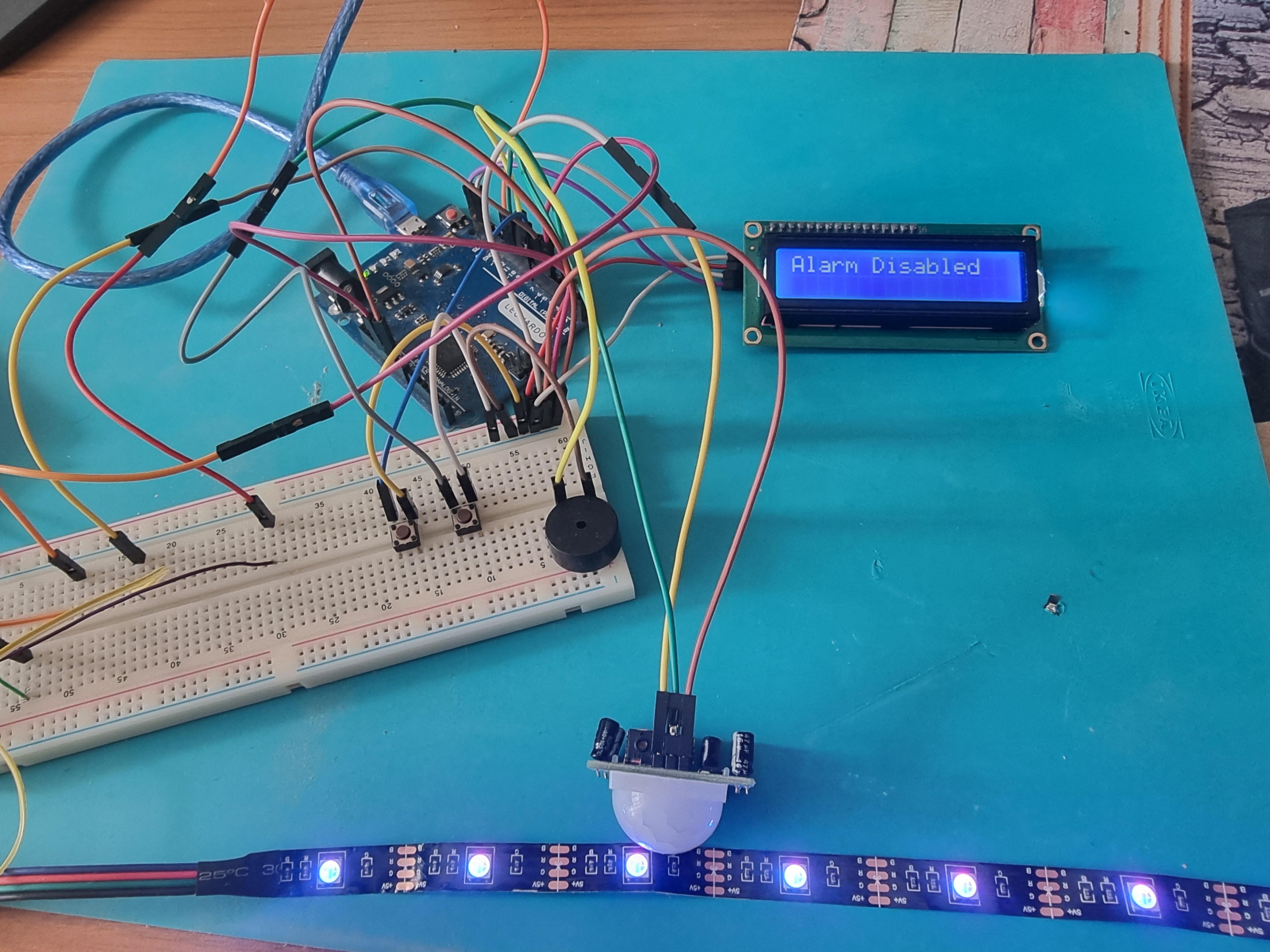
This project is a standalone Arduino-based motion alarm system designed for small-scale home or workspace security. The system integrates motion detection, visual alerts, audio alerts, and user control through buttons and a display.
Key Features:
- Arm/Disarm Functionality:
- A push button allows the user to enable or disable the alarm. The system indicates the current state on a 16×2 I²C LCD display: “DISARMED” or “ARMED”.
- Panic Mode:
- A separate panic button immediately triggers the alarm regardless of whether it is armed, displaying “PANIC!” on the LCD.
- Motion Detection:
- A PIR motion sensor monitors the area. When motion is detected while armed, the alarm triggers automatically, showing “MOTION!” on the LCD.
- Visual Alerts:
- The system uses three LEDs to indicate status:
- → System disarmed
- → System armed but idle
- → Alarm triggered (flashes)
- Audio Alerts:
- A buzzer produces a short beep when arming/disarming and a siren-like tone when the alarm is triggered.
- LCD Feedback:
- The 16×2 I²C LCD displays the current status and blinks messages when the alarm is active, giving a clear visual indicator of the system state.
Supplies
1x Arduino Uno Rev3
1x Jumper wires (generic)
2x Generic button
1x Analog RGB LED strip
1x 16x2 LCD display with I²C interface
1x 5V power supply
1x Buzzer
1x PIR sensor
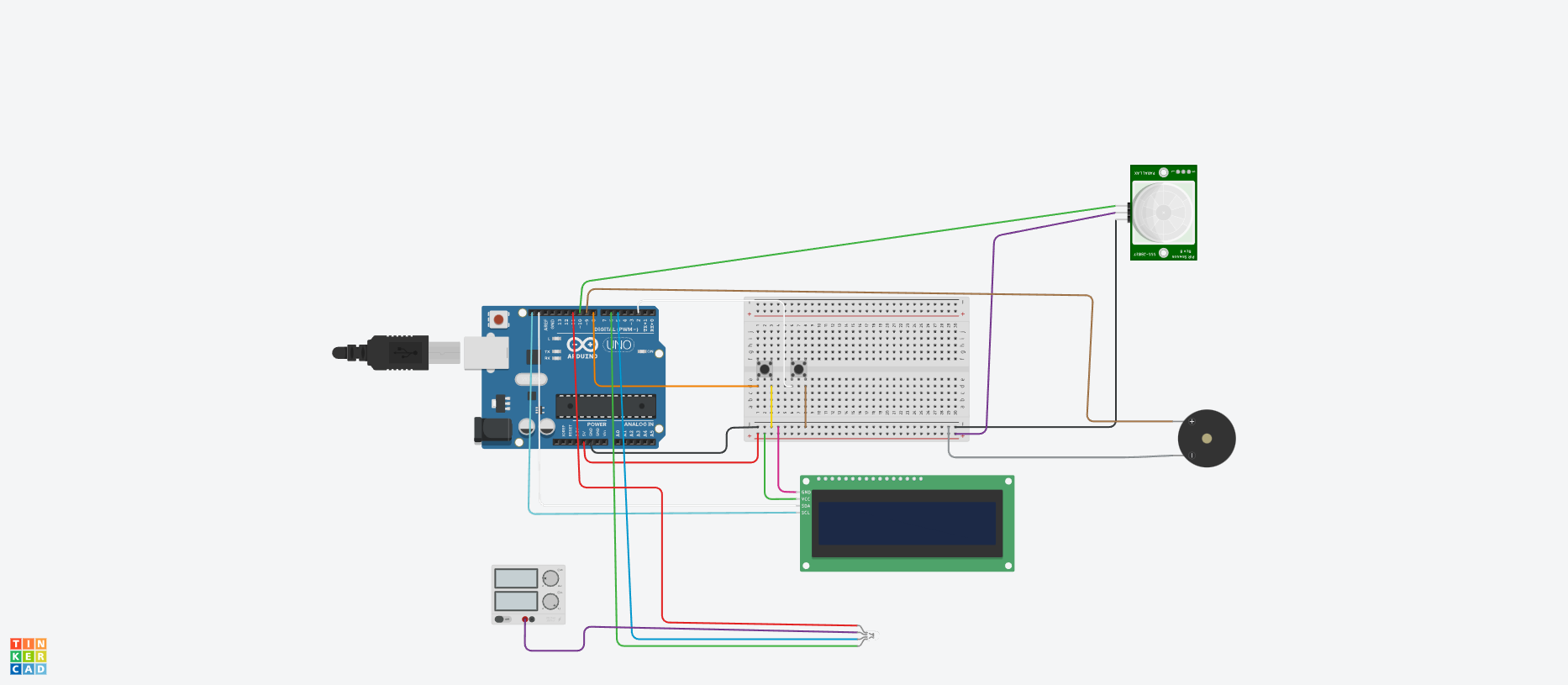
Wire Supplies as seen in the Schematic. NOTE that the RGB Led represents the RGB Led Strip
button-pin8
panicButton-pin2
buzzer-pin9
PIR sensor-pin10
greenLed-pin5
Blue led-pin6
Red led-pin11
Upload the required Code:
#include <Wire.h>
#include <LiquidCrystal_I2C.h>
LiquidCrystal_I2C lcd(0x27, 16, 2);
const int buttonPin = 8; // arm/disarm
const int panicButton = 2; // panic trigger
const int buzzerPin = 9;
const int pirPin = 10;
const int greenLed = 5;
const int blueLed = 6;
const int redLed = 11;
bool alarmEnabled = false;
bool alarmTriggered = false;
bool panicMode = false;
int lastButtonState = HIGH;
int lastPanicState = HIGH;
bool lcdState = true;
void setup() {
pinMode(buttonPin, INPUT_PULLUP);
pinMode(panicButton, INPUT_PULLUP);
pinMode(buzzerPin, OUTPUT);
pinMode(pirPin, INPUT);
pinMode(greenLed, OUTPUT);
pinMode(blueLed, OUTPUT);
pinMode(redLed, OUTPUT);
lcd.init();
lcd.backlight();
lcd.print("Alarm Disabled");
digitalWrite(greenLed, HIGH);
}
void loop() {
int buttonState = digitalRead(buttonPin);
int panicState = digitalRead(panicButton);
// ARM / DISARM BUTTON
if (lastButtonState == HIGH && buttonState == LOW) {
alarmEnabled = !alarmEnabled;
alarmTriggered = false;
panicMode = false;
lcd.clear();
lcd.print(alarmEnabled ? "Alarm Enabled" : "Alarm Disabled");
digitalWrite(redLed, LOW);
// Short beep on toggle
tone(buzzerPin, 1500);
delay(120);
noTone(buzzerPin);
delay(250);
}
// PANIC BUTTON
if (lastPanicState == HIGH && panicState == LOW) {
alarmTriggered = true;
panicMode = true;
lcd.clear();
}
lastButtonState = buttonState;
lastPanicState = panicState;
// PIR MOTION
if (alarmEnabled && digitalRead(pirPin) == HIGH) {
alarmTriggered = true;
panicMode = false;
}
// NORMAL STATUS
if (!alarmTriggered) {
noTone(buzzerPin);
digitalWrite(redLed, LOW);
if (!alarmEnabled) {
digitalWrite(greenLed, HIGH);
digitalWrite(blueLed, LOW);
} else {
digitalWrite(greenLed, LOW);
digitalWrite(blueLed, HIGH);
}
}
// ALARM ACTIVE
if (alarmTriggered) {
// FLASH LEDs
digitalWrite(greenLed, HIGH);
digitalWrite(blueLed, HIGH);
digitalWrite(redLed, HIGH);
// HIGHER WAILING ALARM SOUND
tone(buzzerPin, 1600); // high tone
delay(100);
tone(buzzerPin, 1000); // lower tone
delay(100);
// LCD blinking message
lcd.clear();
if (lcdState) {
lcd.print(panicMode ? "PANIC!" : "MOTION!");
lcd.setCursor(0,1);
lcd.print("Press button");
}
lcdState = !lcdState;
// Turn off LEDs briefly
digitalWrite(greenLed, LOW);
digitalWrite(blueLed, LOW);
digitalWrite(redLed, LOW);
noTone(buzzerPin);
delay(100);
}
}