Recover IPhone/iPad Safari History
by beth_zac in Circuits > Apple
62 Views, 0 Favorites, 0 Comments
Recover IPhone/iPad Safari History

Find a great website on your iPhone and iPad but cannot find the safari history? This article will show you how to recover the deleted or lost safari history from iPhone and iPad. We bookmark the useful and funny website in our safari on iPhone and iPad for the next time visit. If we didn’t bookmark the website and cannot find the safari history, how can we do about this? iPhone data recovery will solve your problem easily. It can recover deleted safari history from iPhone and iPad easily. So you can get the URL of the website that you want to go.
Download and Install IPhone Data Recovery
To recover the safari history, you need to use iPhone data recovery software to help. Download and install it on your computer from the official website.
Connect Your IPhone/iPad
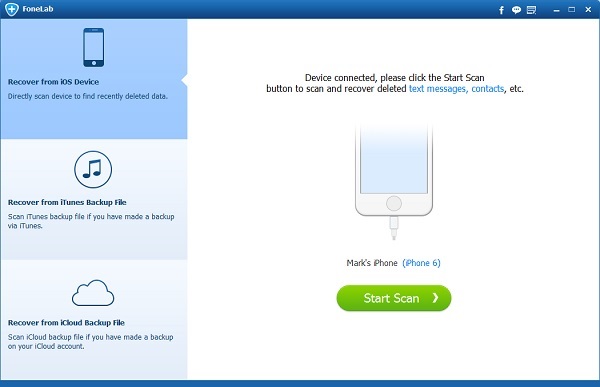
Launch the software and you need to connect your iPhone to your computer via USB cable. This data recovery for iPhone will recognize your iPhone or iPad automatically and load the basic information on the interface.
Scan IPhone/iPad to Find the Deleted Safari History
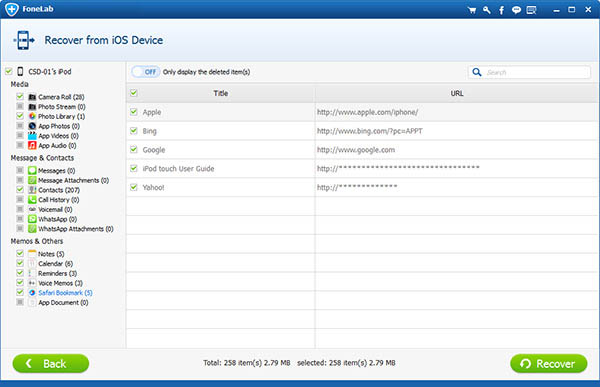
After the recovery software recognizes your device, you need to click “Scan” button to begin the scanning.
Recover Safari History From IPhone/iPad
Once it finishes the scanning, you can see all the data the software found on your iPhone/iPad listed on the interface. You can find your safari histories easily. Choose the safari history you would like to recover and click “Recover” button. You will recover your safari history from iPhone/iPad easily.