RFID Activated LED

by Faheem Ahmed1 in Circuits > Arduino

42 Views, 2 Favorites, 0 Comments

RFID Activated LED

2026-01-21 19.24.46 projecthub.arduino.cc d5d5929411e3.png

This instructable shows you how to use an RFID reader to scan a card and show it is authorised using green and red LEDs

Supplies

RFID module

Green LED(1)

Red LED(1)

Arduino UNO(1)

Jumper Wires(11)

Breadboard(1)

330 ohm resistor(2)

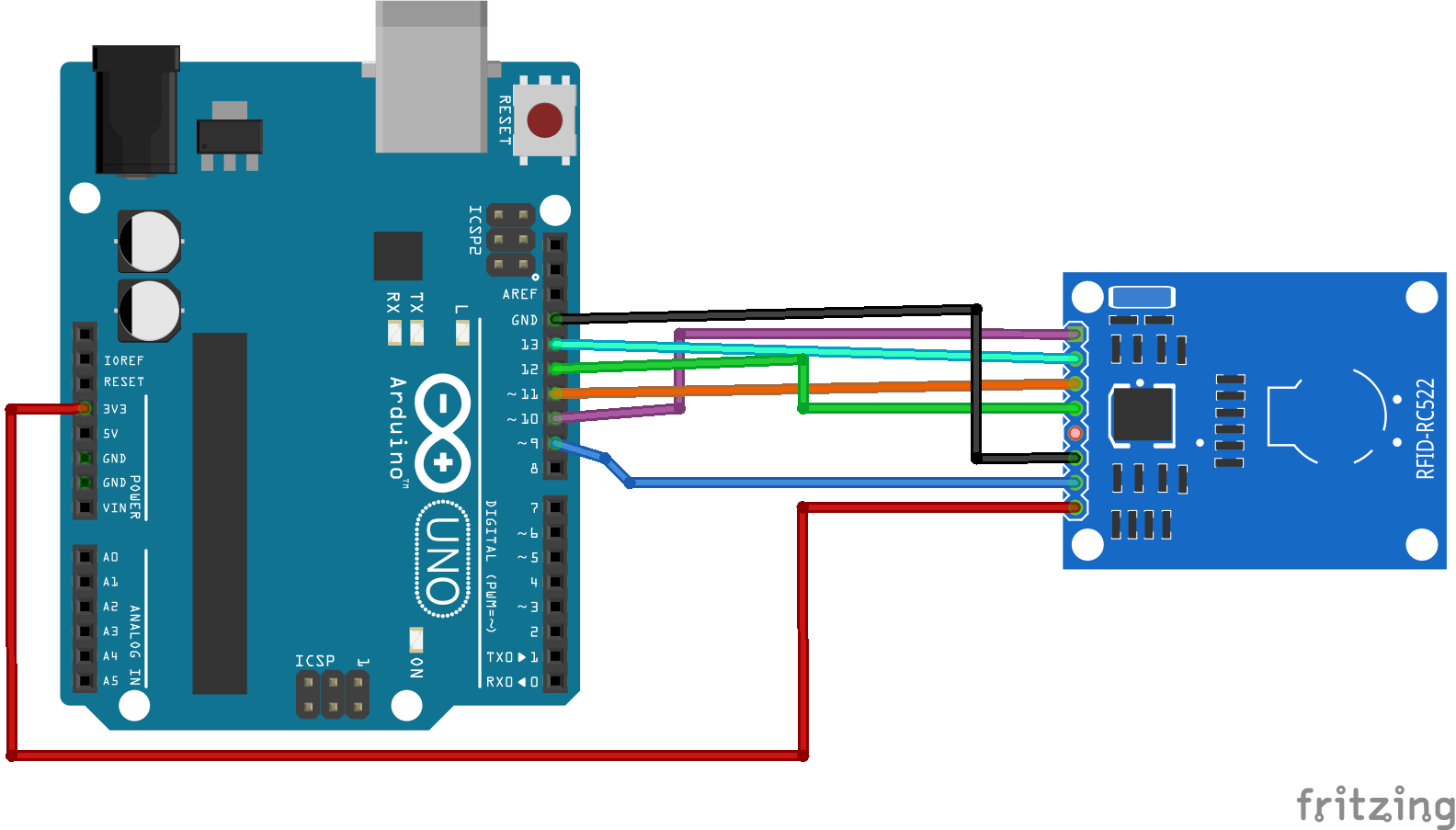
Wiring the RFID Sensor
70d799c0-5ba4-415b-af66-842a9be5cf02.png

Connect the RFID to the arduino according to the diagram above

SDA-D10

SCK-D13

MOSI-D11

MISO-D12

RST-D9

VCC-3.3V

GND-GND

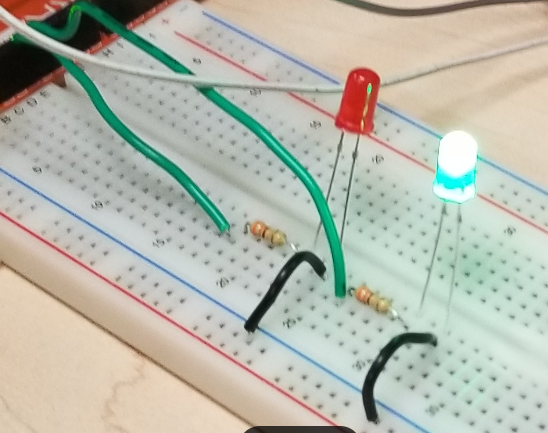
Wiring the LED's to the Arduino
2026-01-21 19.22.16 mail.google.com 9e87f5cf33b5.png

Wire the LED's according to the picture make sure to connect the anode's of the red LED to pin 2 and the green LED to pin 3 then connect the cathodes of the LED's to ground


This allows the arduino to control when the LED lights up


Arduino Code

1 #include <SPI.h>
2 #include <MFRC522.h>
3
4 #define SS_PIN 10
5 #define RST_PIN 9
6 #define RED 2
7 #define Green 3
8 MFRC522 mfrc522(SS_PIN, RST_PIN); // Create MFRC522 instance.
9
10void setup()
11{
pinMode(Green, OUTPUT);
pinMode(RED, OUTPUT);
12 Serial.begin(9600); // Initiate a serial communication
13 SPI.begin(); // Initiate SPI bus
14 mfrc522.PCD_Init(); // Initiate MFRC522
15 Serial.println("Approximate your card to the reader...");
16 Serial.println();
17 pinMode(LED_BUILTIN, OUTPUT);
18 digitalWrite(LED_BUILTIN, LOW); // turn the LED off by making the voltage LOW
19 digitalWrite(Green, LOW);
20 digitalWrite(RED, LOW);
21
22}
23void loop()
24{
25 // Look for new cards
26 if ( ! mfrc522.PICC_IsNewCardPresent())
27 {
28 return;
29 }
30 // Select one of the cards
31 if ( ! mfrc522.PICC_ReadCardSerial())
32 {
33 return;
34 }
35 //Show UID on serial monitor
36 Serial.print("UID tag :");
37 String content= "";
38 byte letter;
39 for (byte i = 0; i < mfrc522.uid.size; i++)
40 {
41 Serial.print(mfrc522.uid.uidByte[i] < 0x10 ? " 0" : " ");
42 Serial.print(mfrc522.uid.uidByte[i], HEX);
43 content.concat(String(mfrc522.uid.uidByte[i] < 0x10 ? " 0" : " "));
44 content.concat(String(mfrc522.uid.uidByte[i], HEX));
45 }
46 Serial.println();
47 Serial.print("Message : ");
48 content.toUpperCase();
49 if ((content.substring(1) == "1A 7C 78 30") || (content.substring(1) == "CC CC A3 16") ) //change here the UID of the card/cards that you want to give access
50 {
51 Serial.println("Authorized access");
52 Serial.println();
53 digitalWrite(LED_BUILTIN, HIGH); // turn the LED on (HIGH is the voltage level)
54 digitalWrite(Green, HIGH);
55 delay(10000);
56 digitalWrite(Green, LOW);
57 }
58
59 else {
60
61 Serial.println(" Access denied");
62 digitalWrite(LED_BUILTIN, LOW); // turn the LED off by making the voltage LOW
63 digitalWrite(RED, HIGH);
64 delay(10000);
65 digitalWrite(RED, LOW);
66
67 }
68}


The code works by checking for card scans in the loop. If the scanned card's UID matches the UID set in the code the green LED lights up if not, then the red LED lights up


Make sure to Replace the Values in ((content.substring(1) ==" ") to the UID of your own card

This code also uses MFRC522 RFID library as well as the SPI library. Make sure they are downloaded and included before you upload the code or else it will not work.

Final Product

If everything is done correctly when a valid card is scanned the green LED turns on and if the incorrect card is scanned the red LED turns on