Mechanical Door Unlocker | Wirelessly Unlock Doors From Anywhere
by RoboticWorx in Circuits > Robots
242 Views, 3 Favorites, 0 Comments
Mechanical Door Unlocker | Wirelessly Unlock Doors From Anywhere
For the best quality read, check out this article on my homepage here. Also, don't forget to subscribe for free to support my work! :)
What's the Project?
Since I've been quite busy building my PolyCast5 multi-tool remote recently, I thought it would be cool if I could use it (or any other ESP32-based device) to wirelessly unlock doors.

The door I interact with every day requires a NFC key card to unlock and open. This is great for security, but can be quite inconvenient. There had been numerous times when I left my key card inside and got locked out. Not great! Luckily, the door can open freely from the inside, which presented an idea!
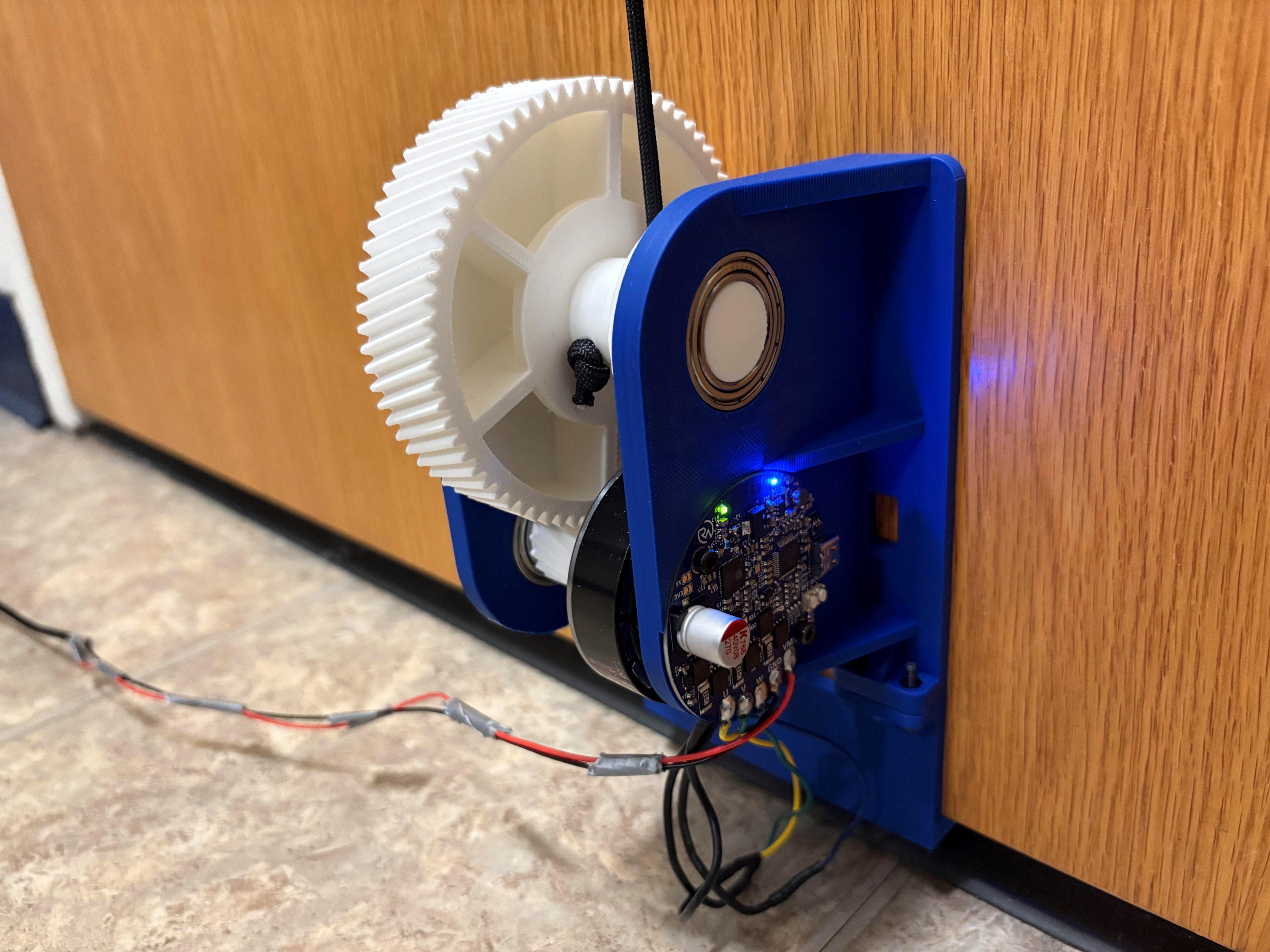
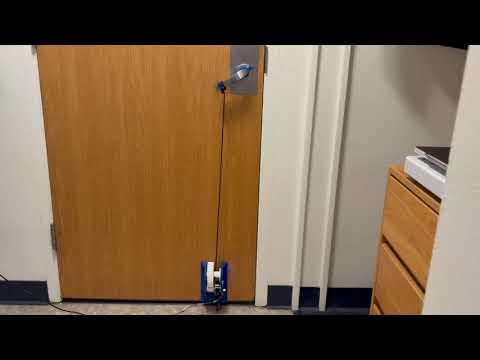
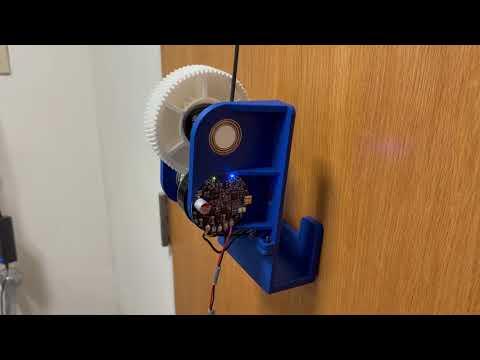
This device uses a BLDC motor, driver, and some 3D printed parts to mount along the bottom of the door and then reel in the handle like a fishing rod.
Continued...
How It Works
To get this working, the biggest issue by far was achieving smooth brushless motor movement. To accomplish this, I used my ERAD2.1 driver, which is basically my ERAD2 BLDC motor driver but with an encoder added to the back. I'll post ERAD2.1 in a separate article, but for now just know it's ERAD2 with an encoder added.

For ERAD2.1 to drive, I'm using an ML5010 BLDC motor. This motor is rated at 300KV, making it a decent pick for a robotics-like application such as this. 300KV means it will theoretically achieve 300 RPM for every 1 volt supplied.
But at 12V, this is still pretty fast. It's dialed down by the SimpleFOC firmware ERAD2.1 is running, but is still too fast and will result in a low torque. To accommodate for this, we can gear it down to transform some of that rotational speed into a higher torque and physically pull down the door handle.
To do this, I'm using a 5:1 gear ratio with 3D printed helical gears.

Not bad! Then to get even more torque, the part that actually reels in the rope attached to the handle has a smaller diameter than that of it's larger gear part. This makes the 'reeling' slower, giving it even more torque to help pull down the handle.

Ironically, this 'reeling' torque was so strong it would actually occasionally break the 3D-printed handle attachment haha. Not to worry though, since the encoder attached to ERAD2.1 is 14-bit, making it so precise that it accounts for every 0.022 degrees! (360/(2^14), though more realistically ~0.05°.) This means that you can control the motor such that it starts and stops at exactly the same place each time, leading to negligible extra 'reeling' to break the handle or it's parts.
If you're enjoying the read, be sure to check out my other projects here.
Wireless Control
With the mechatronics part done, we need a way to control it. Luckily ERAD2.1 has built-in wireless! (ERAD2 clone with an encoder.)

One of my favorite methods of wireless control is ESP-NOW, although you could definitely also set up a simple web server and control it with your phone. For quick and easy ESP-NOW capabilities, I can use my PolyCast5 multi-tool remote! It's DIY device sender capability allows for easy control of any ESP32-based project such as this (ERAD2.1's MCU is an ESP32-S3). Though, PolyCast5 is still in pre-launch, so I understand if you don't have one. (But you can sign up for the pre-launch to be notified upon release!) Though like I said, any ESP32 can work to send ESP-NOW commands! Generic tutorial here.
Continued..
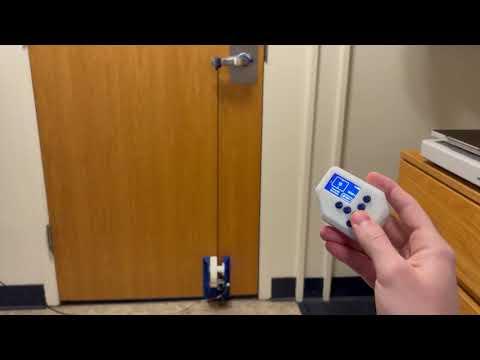
ESP-NOW also has a pretty good range of up to ~150m, making it a good pick. If you want to be able to unlock it while even further away (infinite distance), you can also always connect ERAD2.1 to Wi-Fi and talk to it via MQTT.
ERAD2.1
Like I mentioned previously, this device uses a custom BLDC motor driver (ERAD2.1) which is an improved version of ERAD2 by adding an encoder.
 The original ERAD2 (Everything Robotic Arm Driver v2)
Like ERAD2, ERAD2.1 will also be open-sourced in its entirety! I hope you can build some cool stuff with it, since it can drive basically any BLDC motor (<~10A) and has built-in wireless which is pretty cool. A separate article will be posted shortly with the changes made as well as all the new files. If you would like to build this project, please wait for that to be posted so you can use the new design. (I will update this when it is!)
When the new design is posted, you can order the boards easily via a PCB manufacturer such as PCBWay! They supplied the boards I used in prototyping, and they've always been great.

I've never had to question their quality and they also offer many other services such as CNC machining, 3D-printing, and PCB assembly. Since I designed with KiCad, I didn't even have to leave my design software to check out, thanks to their convenient plug-in! If not though, you can always just go to PCBWay.com, click on quick-order PCB, and upload the Gerber file for the board. Or alternatively, just go here which I have saved in my favorites bar.


Everything else you can leave as the default, unless you have any specific adjustments you want to make. (Lead-free surface finish, remove product number, etc.) You can also increase the copper thickness if you plan to use this for a high-power application like an e-bike. This will help with cooling and enable better conduction.
After that, you're good to go!
Code
To program ERAD2.1, I'm using Arduino IDE with SimpleFOC. ERAD2.1 is fully compatible with Arduino IDE thanks to it using an ESP32-S3 at the center, which has its own Arduino core. This is great because it makes ERAD2.1 super easy to program. With just ~250 lines of code you have a working wireless BLDC motor driver! Let's check it out below.
Now we can break down the important parts.
The first important bit is these global variables to track what is happening. We only want the motor to move whenever a command is sent, and it is the right command. So, we can use a toggle_request variable to determine if it actually received anything as well as a cmd_received variable to hold what was sent.
Since there are only two positions (door unlocked or locked) we can use another bool pos_state to track which state should be picked.
The next important part is the callback that is executed whenever a command is received. This is important because me must verify what command was actually sent. Wouldn't want anyone to be able to unlock out door!
Though I should note that this current example does NOT use encryption. This means that anyone with an ESP32 who is also reading this article would be able to open the door. Always use encrypted ESP-NOW for sensitive applications! (This is just an example.)
I should also point out that you typically shouldn't use print (Serial.print) statements in callbacks since they slow execution. Anyway, let's dive in!
In the callback, we firstly print out the sender's MAC address. This isn't required but can be useful for debugging. Then, we verify the data:
Since I'm sending with my PolyCast5, I added a unique prefix to the command "PolyCast5_Command_Value: ". This ensures that it isn't possible to guess the correct number when encryption is enabled, or to just make sure that the door never randomly opens when a command is received. (Because the command must be prefixed with the correct string.)
This said, if you decide to try this project out, make sure to either send the command with the string or remove the string parsing part of the code!
After that, if the command is extracted successfully and it isn't a zero, set the toggle_request bool to signal that there should be a change in state.
Other than that is just the typical SimpleFOC setup code for use with an encoder. Then in the main loop, we have two timers. One for blinking the on-board LED (every 500ms), and one for debugging (Serial.print every 100ms).
Then, if the toggle_request bool was set in the callback (something was received), simply flip the position state and set the new target angle to either the command received (uint8_t in radians) or 0 (starting position).
That's all!
Continued....
Assembly
First, print everything out and get some M3 nuts and bolts handy. After that, you can go ahead and mount the smaller helical gear to the rotor of the ML5010 using four M3x30 bolts.

From there, go ahead and push in two M3 nuts to the back of the motor mounting piece. This is required for mounting the ERAD2.1 PCB later.

You can then similarly do the same for the connecting bracket.

Now you can screw in the motor using four M3x12 bolts.

Before progressing, it's important to point out here that you will need a small diametrically magnetized magnet to glue to the back of the ML5010 so it can be measured. For this I just bought a cheap encoder off Amazon, then stole the magnet. Wasteful, but it works.

With that, you can go ahead and screw in ERAD2.1 using two M3x12 bolts. They should thread nicely through the nuts you pushed into the housing earlier.
For wiring up ERAD2.1, I just connected the U, V, and W phases to the motor leads sequentially. It doesn't really matter the order, since if yours is different from mine it'll just spin the other direction which can be corrected in the code. To power it all, I'm just using a basic AC adapter in which I exposed the DC ends. It only supplies 12V, but that's still plenty for just pulling a door handle down.

Then we need to mount the bearings. To do this I used a bar clamp, though a mallet would also work. It's a tight fit, but that's intentional!


You can then use some thin paracord rope and push it through the hole in the larger helical gear. If you have trouble getting it in, I would recommend pushing it down with some tweezers.

From there you can pop it into the motor casing.

And the other half!

Then to secure it, insert two M3x12 bolts (flexible sizing) through the connector bracket.

The only thing left is to connect the rope to the door handle.
To start, grab the two handle halves and push two M3 nuts into the hex indentions.

Then, snap them around the handle and screw in two M3x12 bolts (flexible sizing).

With that, you can just wrap around the paracord and tie a quick knot.
Be sure that the rope tension is tight, since you want to make sure that the device starts reeling as soon as the motor moves without any extra slack.

That's it!
BOM (Bill of Materials)
I’ll put everything that you need to have to build the project here (besides the ERAD2.1 files which will be posted separately) so that you don’t have to go scrolling around looking for the links I sprinkled throughout the article.
- All the CAD for this project can be found here on my Thingiverse.
- The editable STEP design file is available here to plus subscribers. Thanks so much for your support!
- Some nuts & bolts
- Basic screwdriver kit (one of many options)
- AC adapter to power the motor from an outlet
- Encoder to steal a diametrically magnetized magnet from
- Super glue
- Bar clamp
- 20mm Bore 32mm OD bearings
- Paracord rope
- If you don’t already have them:
- Mini soldering iron (what I use, but any will do) - for ERAD2.1
- Solder paste - for ERAD2.1
- Solder (my roll of choice) - for ERAD2.1
- Hot plate - for ERAD2.1
- Adjustable lab-bench power supply
- 3D-printer filament (my go-to)
- Hot air rework gun (great for fixing broken or misaligned ICs)! - for ERAD2.1
Disclosure: These are affiliate links. I get a portion of product sales at no extra cost to you.
Thanks for reading! I hope this was a helpful and informative article. If you decide to do the build, please feel free to leave any questions/thoughts in the comments below. If not, I hope you were still able to enjoy reading and learn something new!
Have constructive criticism or a suggestion for a future project? I’m always looking to improve my work. Leave it in the comments! Until next time.
Be sure to follow me on Instagram! If you want to learn more cool stuff, I also highly recommend Branch Education and Kurzgesagt on YouTube. :)
If you feel this read was worth at least $5, please consider becoming a plus subscriber on the homepage. I don’t use ads, so I rely on your support to keep going. This is a quick read for you, but I’ve been working on this for a while! You will also receive the following benefits.