How to Transfer Music From ITunes to Samsung Galaxy S7/ S6/S5/S4?
by Miss PhoneTransfer in Circuits > Apple
236 Views, 2 Favorites, 0 Comments
How to Transfer Music From ITunes to Samsung Galaxy S7/ S6/S5/S4?

Have got a new Samsung Galaxy phone but have no idea on how to put your loads of iTunes music to the Samsung Galaxy? No sweat, two methods of moving music from iTunes to Galaxy will be introduced at great length in this article.
To be honest, some tools of transferring different data between smart phones have already existed, they are designed to support various kinds of phones, such as iPhone, Samsung, LG and Huawei. It results that many smart phone users don't have a clue about which tool is better for them. To answer this question, the editor today will expound for the first time on how to transfer iTunes music to Samsung Galaxy S7/S6/S5/S4. And in the next following articles, the editor is supposed to write related articles on this "Transfer tool" topic.
Sync ITunes Music to Android Phone Samsung Galaxy by Using Samsung Smart Switch
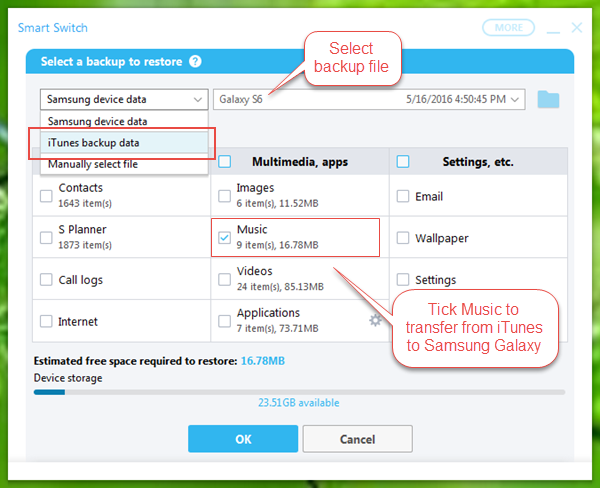
Samsung Smart Switch is developed by Samsung which can connect your Samsung Galaxy to PC and make it easy to move your music from iTunes to your phone, but it sometimes fails to recognize Samsung Galaxy 2 or older version. You'd better download it on the Samsung official website, below is the tutorial on how to transfer music from iTunes to Samsung Galaxy via Samsung Smart Switch on a Windows PC (Or you may download the Samsung Smart Switch for Mac).
- Download the Samsung Smart Switch of Windows version from Samsung website, then install and run it.
- Connect your Samsung mobile phone to the PC via USB. When your Galaxy phone is connected, click “Restore”> “Select a different backup”, then choose “iTunes backup data”.
- Select the right iTunes backup file, and tick “Music”, lastly click “OK” > “Restore now” to start the transferring.
Transfer Music From ITunes to Samsung Galaxy by Using Gihosoft Mobile Transfer
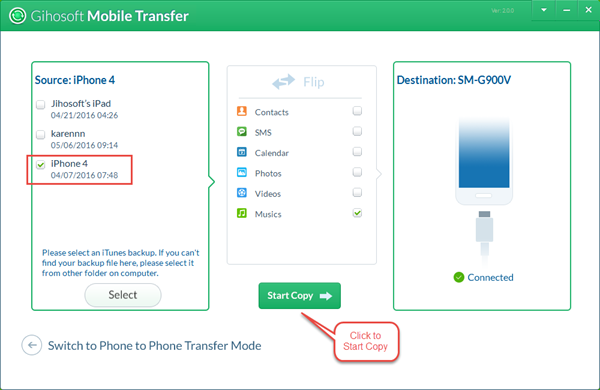
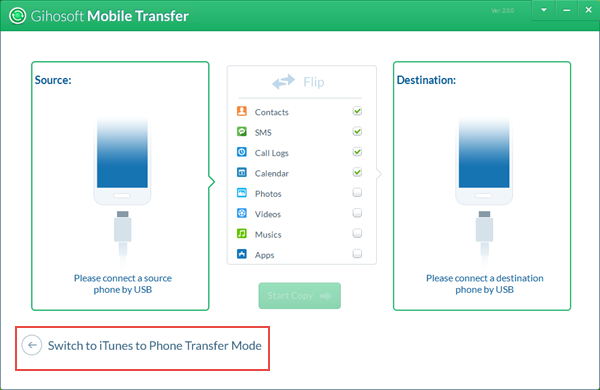
To some extent, Samsung Smart Switch is a good tool to transfer iTunes music to Samsung Galaxy S6/S7, but it cannot be greatly compatible with other older Samsung series like Galaxy S2. What if you have another mobile phone but it cannot support? Then Gihosoft Phone Transfer is highly recommended to you, it is a powerful tool to support almost all of smart phones released on the market.
- Download Gihosoft Mobile Transfer and run it, then open and click “Switch to iTunes to Phone Transfer Mode”.
- Connect the Samsung Galaxy phone to PC.
- Select an iTunes backup. (If you cannot find the backup file you want to transfer, you may need to sync your music to the iTunes first.)
- Choose the “Music” file and click “Start Copy” to export iTunes music.
When you move iTunes music to a Samsung Galaxy phone, you can choose one of the two methods to transfer.
Related articles: