How to Transfer Music From IPhone to IPhone
by beth_zac in Circuits > Apple
11 Views, 0 Favorites, 0 Comments
How to Transfer Music From IPhone to IPhone
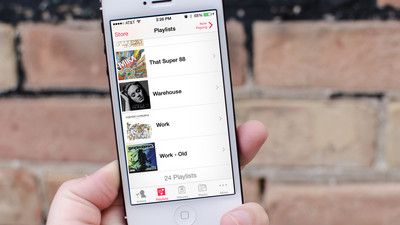
This article will show you the best way to transfer music from one iPhone to another directly without using iTunes. If you just want to do this, you come to the right place. You can learn the easiest way to transfer music from iPhone to iPhone.
We will use iPhone Transfer software in this article. It can connect your two iPhones and transfer files between them easily. You don’t need to run iTunes. This software can also transfer contacts, photos, videos, movies, TV shows, playlist, messages, and other data between two iOS devices and between iOS devices and computer.
Run IPhone Transfer and Connect Your IPhones
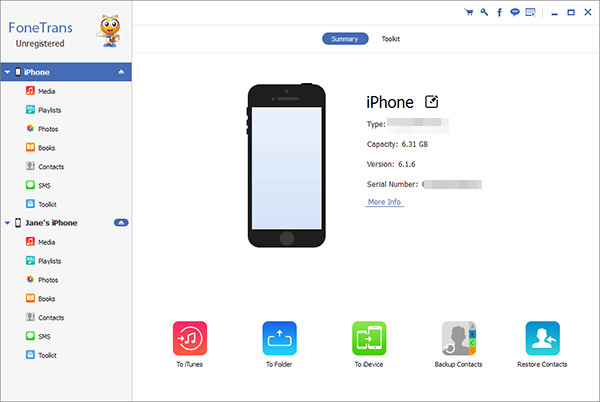
After installing the software on your computer, it will run for the first time automatically. Connect both of your iPhones via USB cables and don’t disconnect either of them until you finish the music transfer. The software will detect your iPhone and load them to its interface automatically.
Select Music on IPhone
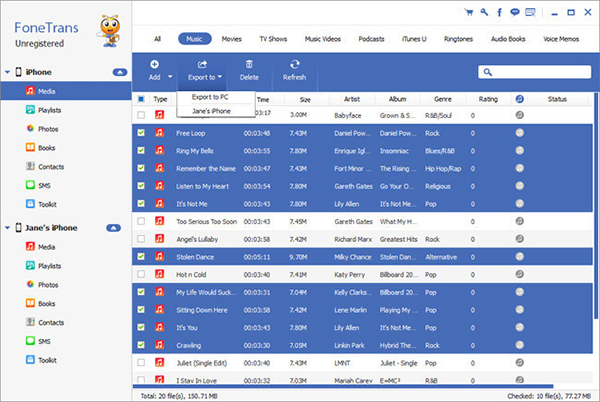
On the left side of the interface, you can see the two iPhones’ name. Select the one you want to transfer music from and click “Media” > “Music”. You will see all the music on this iPhone listed on the interface. Select the music you want to transfer to the other iPhone.
Transfer Music From IPhone to IPhone
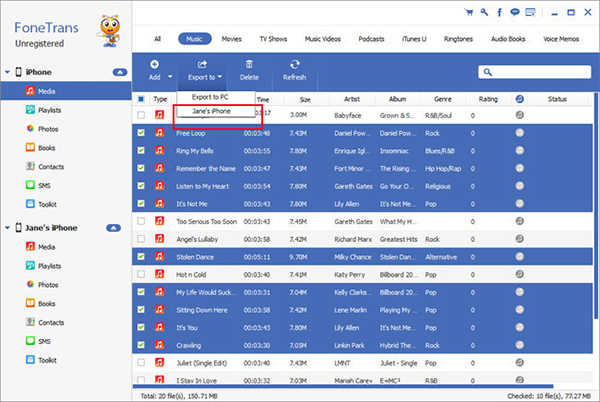
Once you select all the songs you want to move to the other iPhone, click “Export to” option. Select the name of the other iPhone in the drop-down list. All the selected music will be transferred to the other iPhone as soon as possible. When the software finishes the transfer process, you can check the music on your iPhone.
iPhone Transfer software can not only transfer music from iPhone to iPhone, but also transfer contacts, photos, videos, movies, playlist, messages and other files from iPhone to iPhone and among different iOS devices and computer.