How to Transfer Data From Android to Android Via Bluetooth
by Paric_ in Circuits > Wireless
154 Views, 1 Favorites, 0 Comments
How to Transfer Data From Android to Android Via Bluetooth

Bluetooth, a wireless technology to transfer various data between two devices over short distance, is a built-in function that allows users to freely transfer data from Android to Android. Also, it is considered as one of the most common and simplest Android file transfer methods in the market. Next, this article will guide you on how to transfer data from Android to Android via Bluetooth step by step.
Turn on Bluetooth on Your Devices.
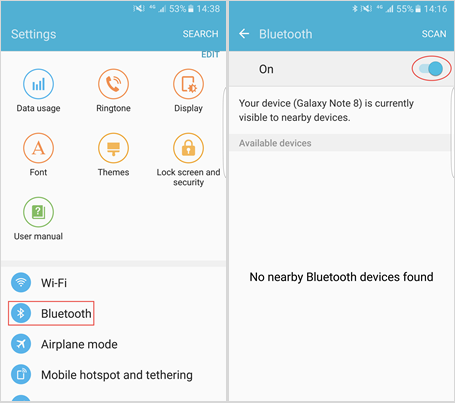
Open “Settings” app on your phone, and scroll down to find “Bluetooth” option. Tap on it and then you can switch it on. Or you can just pull down the menu in your phone’s desktop, and you will see the shortcut key of Bluetooth on the top.
Set Bluetooth and Pair Your Devices.

Enter the Bluetooth interface, where you can rename your Bluetooth device, and set your phone visible to nearby device. Then scan for your another phone and pair them after it is detected.
Transfer Data to New Android Phone.
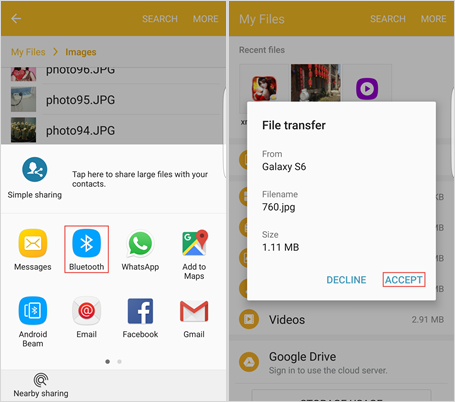
After your android phones are paired and connected via Bluetooth, you can transfer data to the new android by simply sending and receiving. Open “File Manager” on your old android and select the photos, music, videos, APK packages, etc you want to transfer. Next, tap on the menu button, click “Share” and choose “Bluetooth” in the pop-up window. Then you will get into the Bluetooth interface. Please select your new android as destination. At last, go to your new phone and click “Receive”.
Note: If you want to transfer contacts or text messages, please open the “Contact/SMS” app and choose what you want. Then repeat the “Share” > “Bluetooth” > “Receive” process.
Tips
To be honest, transferring data with Bluetooth is not the best approach. The process is quite complicated. If you are looking for a much easier method, Jihosoft Phone Transfer is highly recommended, because this fantastic program allows you to transfer data from Android to Android by just one click!