How to Transfer Contacts From Android to IPhone
by beth_zac in Circuits > Apple
23 Views, 0 Favorites, 0 Comments
How to Transfer Contacts From Android to IPhone
Every year after Apple releasing the latest iPhone, many Android users will switch their mobile phone to iPhone. Yes, you have to say iPhone is now the best smart phone on the planet. Everyone wants to have a try on it. However, when you switch from Android to iPhone, how to transfer contacts from Android to iPhone becomes a problem for most of the users. In this article, I will introduce an easy way to do this for you. You just need your computer, Android phone, iPhone and phone to phone transfer software.
You can download the transfer software here for free:
Install Phone to Phone Transfer
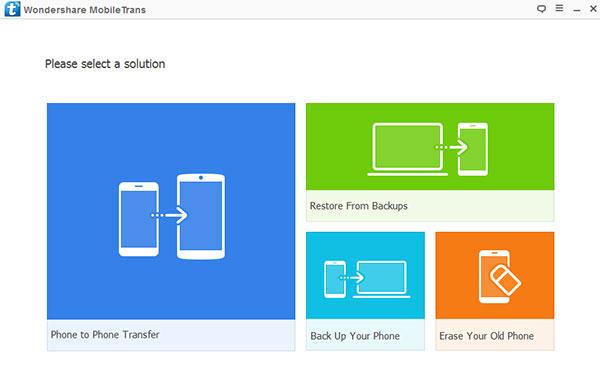
Install it on your computer after downloading and run it. You will see many options on the main interface. You need to select the first option “Phone to Phone Transfer”. Using this function, you can transfer contacts, videos, movies, messages, photos and many other data between different smart phone, such as iPhone, Android phone, Windows Phone, Blackberry and so on.
Connect Android Phone and IPhone
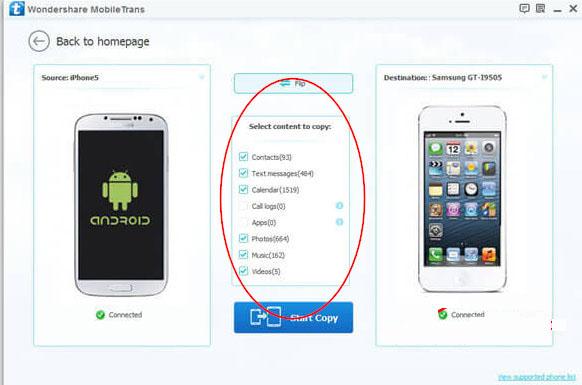
Connect your Android phone and iPhone to your computer. The software will detect your phones easily and load them to the interface. If you want to transfer contacts from Android phone to iPhone, you need to make sure the Android phone is on the left and iPhone on the right. You can click “Flip” button to change the order.
Transfer Contacts From Android to IPhone
In the middle of the interface, you can see the data list that you are allowed to transfer from Android to iPhone with this software. Select “Contacts” and uncheck other options and then click “Start Copy”. All the contacts on your Android phone will be transferred to your iPhone easily.
Once the software finishes the work, you can check the contacts you just transferred from Android to iPhone.