How to Transfer Contacts From Android to Android
149 Views, 1 Favorites, 0 Comments
How to Transfer Contacts From Android to Android
)
When updating to a new Android phone, like the hottest Samsung Galaxy S8/Note 8, Huawei Mate 10, transferring contacts must be the first thing on your to-do list. Many users consider it a a daunting task. Actually, it can be quite quick and easy. Here I would like to introduce a simple solution to transfer contacts from Android to Android.
Download & Install Jihosoft Phone Transfer
Jihosoft Phone Transfer is one of the best mobile phone transfer tools in the market. It could transfer contacts, call logs, text messages, photos, videos, musics, calendar and apps between Android and iOS devices by one click.
Launch This Excellent Tool
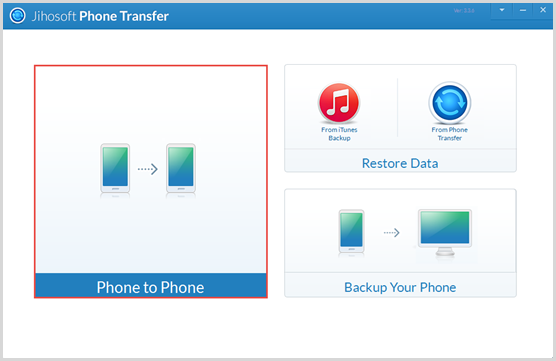
Double click the icon on desktop and tap on the "Phone to Phone" button on the homepage.
Connect Your Devices to Computer
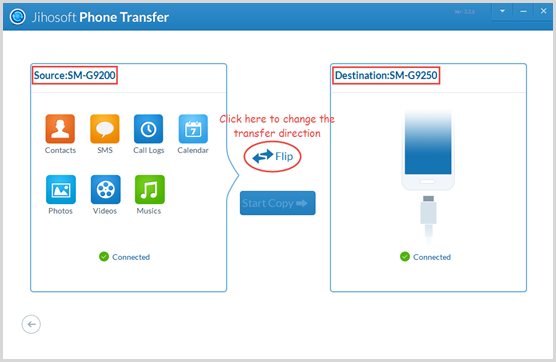
Plug both of your Android phones to computer via USB cables. Make sure the new one is connected as "Destination". If not, click "Flip" to change it.
Choose Data You Want to Transer

All the data that can be transferred will be listed out in the "Source" panel. Besides contacts, you can also transfer SMS, call logs, calendar, photos, videos and music. Please mark those you want.
Transfer Contacts to New Android
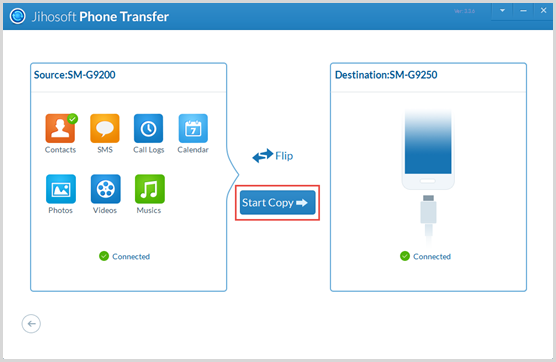
Click "Start Copy" to begin the transfer process after you have selected data type. This process can last few minutes according to the quantity of data you want to transfer. Please wait patiently.
Note:
- You can download this excellent tool by this link: http://www.jihosoft.com/mobile/phone-transfer.html
- Other useful solutions: http://www.jihosoft.com/android-tips/transfer-contacts-from-android-to-android.html