How to Remove Unwanted Objects From Photo Without Photoshop
by JocelynPhoto in Design > Digital Graphics
2763 Views, 4 Favorites, 0 Comments
How to Remove Unwanted Objects From Photo Without Photoshop


In this tutorial, you will learn how to quickly and easily remove any unwanted objects from your photo without Photoshop for FREE. We are going to use a software named Jihosoft Photo Eraser, which is a photo editing tool that will allow you to erase any unwanted objects, persons, watermarks, texts, shadows and etc. from your photo.
Download and Install the Program
Head over to Google, type in "Jihosoft Photo Eraser", then hit the search button. Find the product website and then download and install it onto your computer.
Import the Target Photo
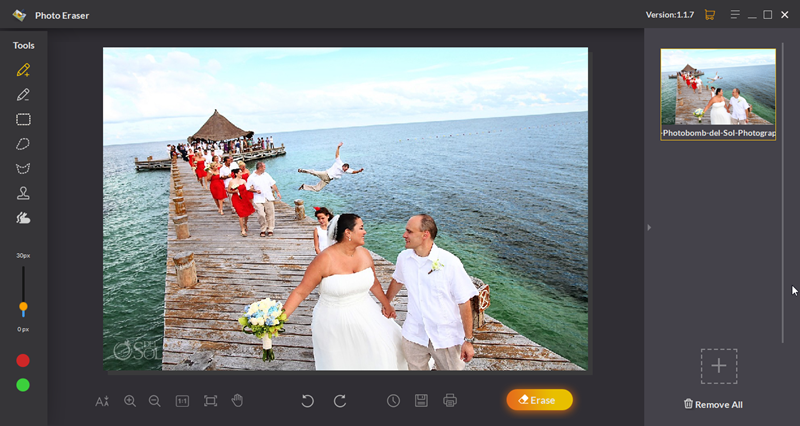
Once installed, just click on the program icon to open it. Then go to your image file and select your target photo, drag and drop it to the program.
Highlight the Unwanted Area
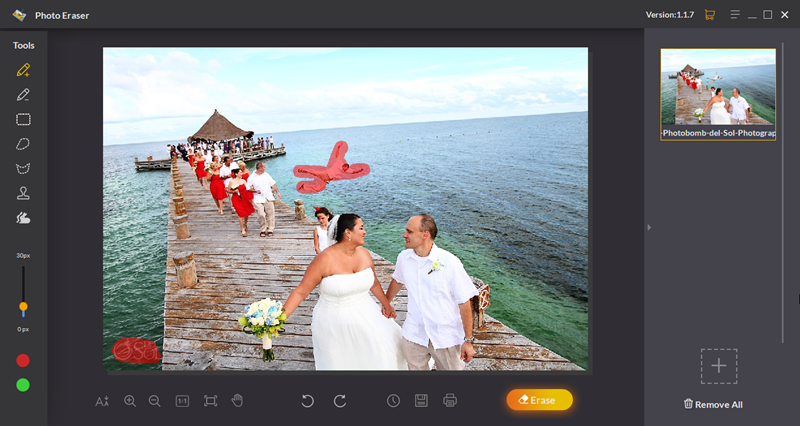

Choose the Brush Tool to highlight the area around the unwanted object, and then click on the Erase button on the bottom right of the interface. Now you will have the perfect clear photo.
More photo editing tips, please visit our photography blog here.