Car Parking Assist With 555 Timer

This is a simple project which in the end will allow you to create a Parking Assist; which will help you park your car. This circuit allows you to see how close you are to another vehicle which allows for safe and clean parking.
This is an idea the I had thought of originally but decided to add a 555 Timer to make a bit more complex and interesting.
Supplies
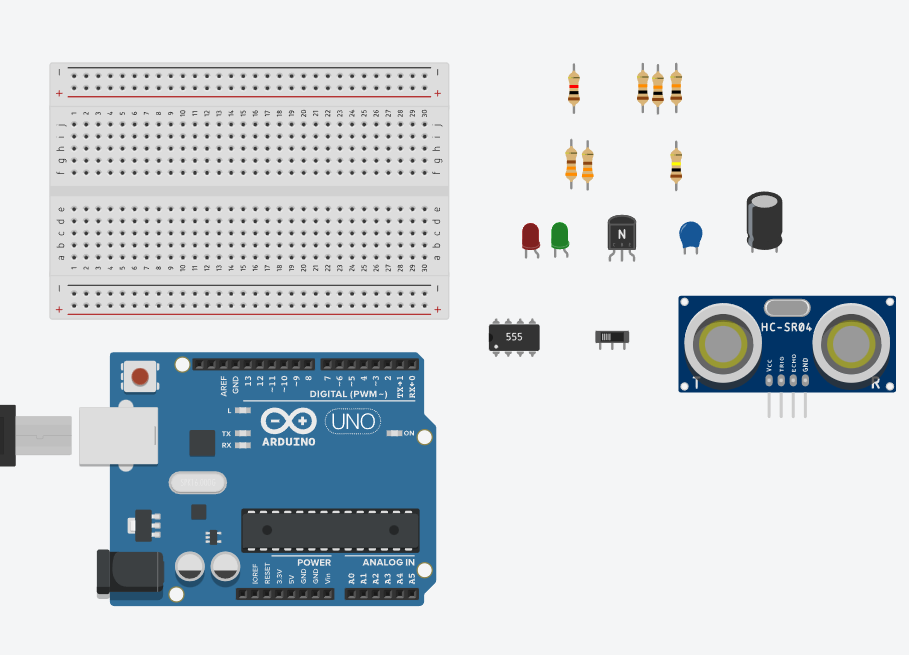
Materials Used:
- 1x Breadboard
- 1x Arduino Uno
- 1x 555 Timer
- 1x Ultra Sonic Distance Sensor
- 2x LED’s
- 1x Slide Switch
- 1x 0.01uF Capacitor
- 1x 10uF Capacitor
- 1x NPN Transistor
- 1x 330 ohm resistor
- 1x 1k ohm resistor
- 3x 10k ohm resistors
- 1x 100k ohm resistor
- Wires
Circuit Schematic
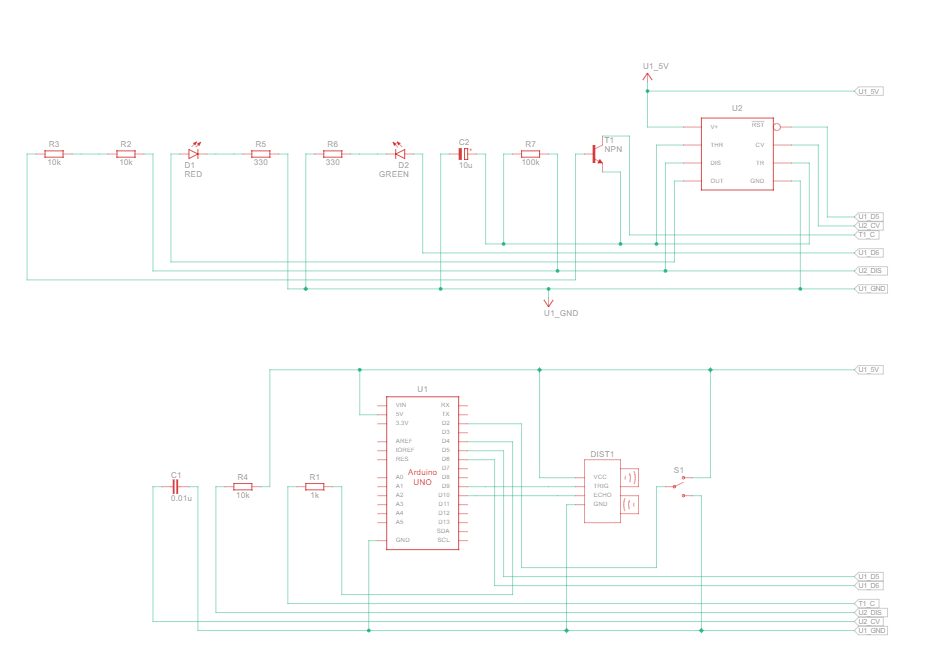
This is the Tinkercad schematic of the circuit which shows every connection you need to make.
Breadboard Assembly 1

Place the Distance Sensor, 555 Timer, NPN Transistor, and LED's on the Breadboard.
Make sure you get power and ground from the Arduino and connect them to the power and ground rails on the breadboard. Ensure that you connect power and ground to BOTH sides of the breadboard.
Next give power and ground to the Distance Sensor, 555 Timer and Slide Switch. Afterwards use the 330 ohm resistors to connect the LED's cathode to ground.
If you did not understand these steps Look at the image provided.
Breadboard Assembly 2

Next you need to add the 10uf Capacitor to the 555 Timers Trigger pin(pin 2) and ground.
After connect the 0.01uf Capacitor to the 555 Timers Control Voltage pin(pin 5) and ground.
Then connect a 10k ohm resistor from the 555 Timers Power pin(pin 8) to the Discharge pin(pin 7).
If you did not understand these steps Look at the image provided.
Breadboard Assembly 3
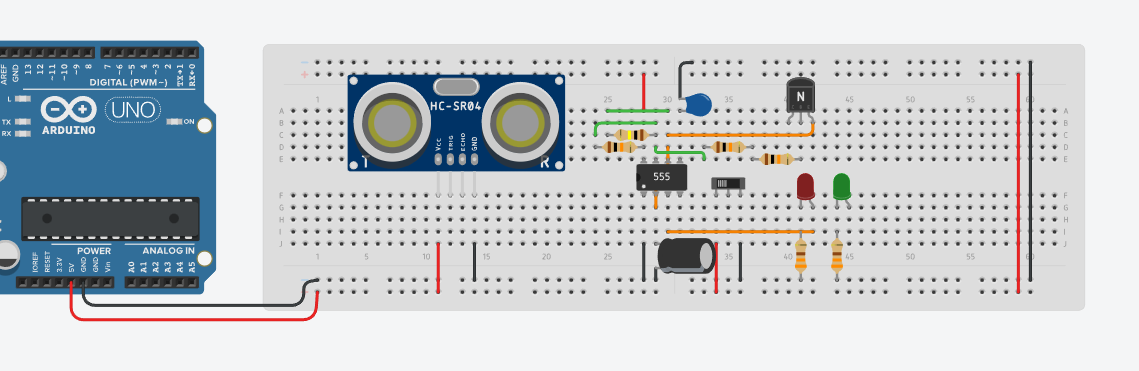
Next add a 100k ohm resistor going from the 555 Timers Discharge pin(pin 7) to Threshold pin(pin 6).
Connect the 555 Timers Threshold pin(pin 6) to the Trigger pin(pin 2), Also connect the Out pin(pin 3) to the anode of one LED.
Afterwards connect the NPN Transistors Emitter leg to the 555 Timers Threshold pin(pin 6). Then connect the NPN Transistors Base leg to the 555 Timers Discharge pin(pin 7) using two 10k ohm resistors connected in series.
If you did not understand these steps Look at the image provided.
Breadboard Assembly Final
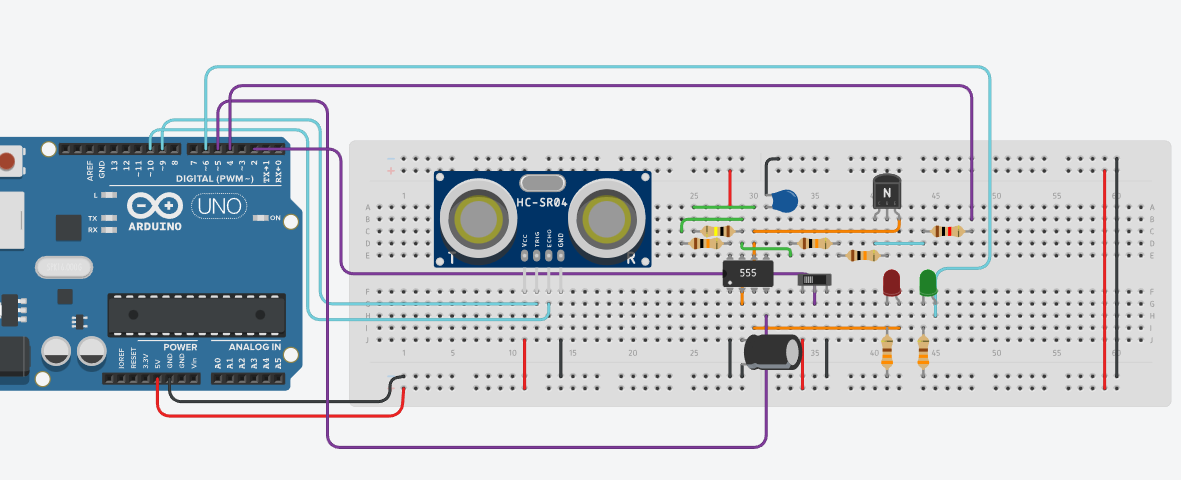
Next you will connect your components to the Arduino.
Connect the NPN Transistors Collector leg to Arduino pin 4 using a 1k ohm resistor.
Connect the 555 Timers Reset pin(pin 4) to Arduino pin 5.
Connect the Distance Sensors Trig leg to Arduino pin 9 and the Echo leg to pin 10.
Connect the LED NOT connected to the 555 Timer Arduino pin 6.
Connect the Slide Switch to Arduino pin 2.
If you did not understand these steps Look at the image provided.
Code 1

This is the basic beginning of the code where you declare the variables you will use and what pin each component is connected to.
Code 2

This is the setup code where you declare what each component is, either a Input or Output. You also use "Serial.begin(9600)" so you can use the serial monitor once you finish the code.
Code 3

This is the main part of the code where you use the Ultra Sonic Distance Sensor only when the Slide Switch is on. This is the code which allows the sensor to actually function(distance is in centimeters).
Code Final
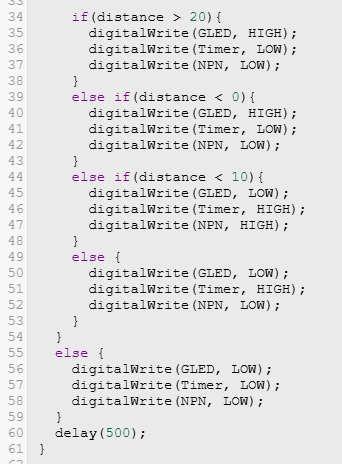
This is the part of the code which allows the distance to control the LED's. There is an additional Else if statement which is "distance < 0", this is because my distance sensor was a little buggy and went negative sometimes when you weren't close so I added this to fix it.
The final Else statement is there from the first If statement with the Slide Switch, so when the switch is off the entire circuit stops.
You can use the Serial Monitor to check accurate distance.
Final Product
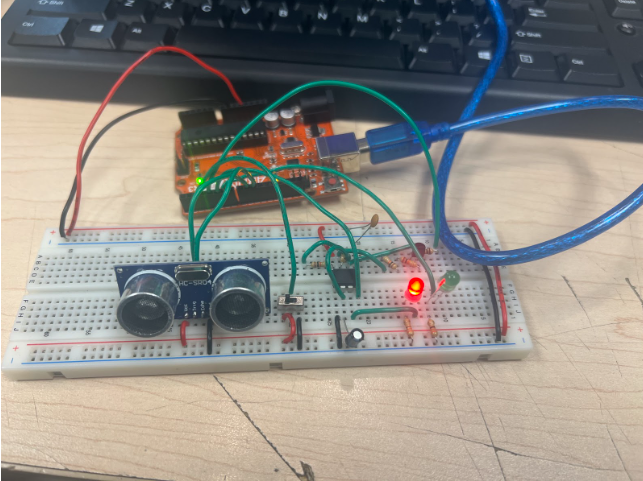
This is how the project I personally made turned out.
When you are 20cm away from the Distance Sensor the Green LED turns on, when you are within 10-20cm the Red LED turns on and when you are within 10cm the Red LED begins to blink rapidly.
This is a very simple project and I hoped that you enjoyed creating it. There is also a lot you can do to improve this further so I hope you do so.