Butter Robot

Say you sat down and you're ready to eat your pancakes when you realize the butter is on the other side of the table, place this robot down and it will go grab the butter for you. (inspired by rick and morty)
Supplies
lens, metal, wires, battery pack, 3D printer, Microcontroller, motors, wheels, chassis, and butter.
Beginning the Design
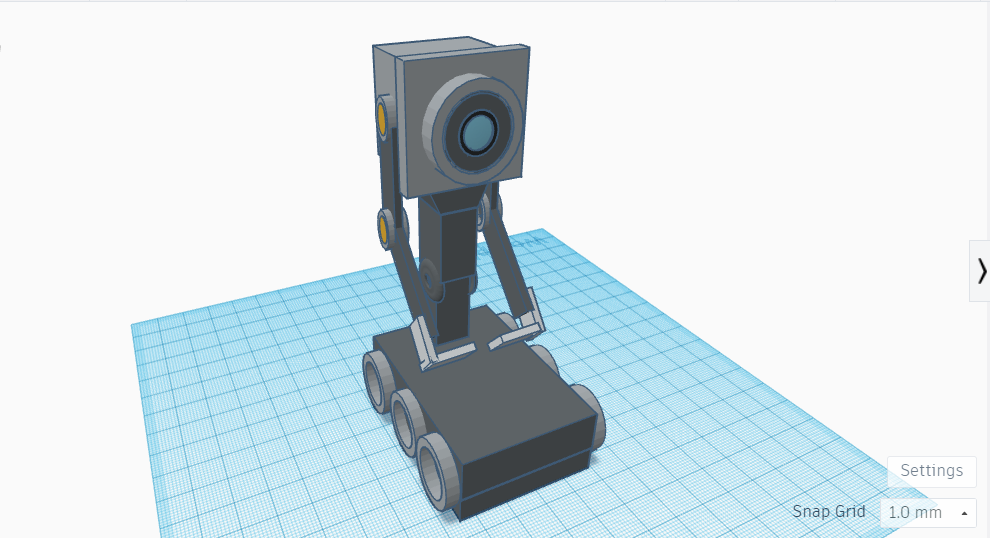
Start by designing and 3D printing the chassis. Use any CAD software to create a simple robot frame that can hold the microcontroller, motors, ensuring it has compartments for all components. Print the designed parts or construct the frame using metal. Once the chassis is ready, mount the motors in their designated spots. These motors will be used to control the arm's movement. Attach the wheels to the chassis and connect them to the motors.
Arm Mechanism
We're going to start working on the arm mechanism by attaching the arm to the motor. Once the assembly is complete, connect the motors to the microcontroller's PWM pins using a breadboard. Make sure the battery pack is connected properly to supply power to the microcontroller and motors.
Coding

Now we have to program the microcontroller. We have to write a simple program to control the motors that will make the arms move up and down. We can use the Arduino IDE or another software that is similar to upload the code to the microcontroller. Once the robot is assembled and programmed, make sure you test it and observe its movements. Make adjustments if necessary.
Voice Module (Optional)
You can add a voice module to make the robot say "what is my purpose?".
Last Step
Set it on the table and let the robot get you the butter.