🪄 Restore & Upgrade a Vintage 1940s Radio With Arduino + FM + OLED Display (Full Parts List 2026)
by TylerDDDD in Circuits > Arduino
307 Views, 0 Favorites, 0 Comments
🪄 Restore & Upgrade a Vintage 1940s Radio With Arduino + FM + OLED Display (Full Parts List 2026)


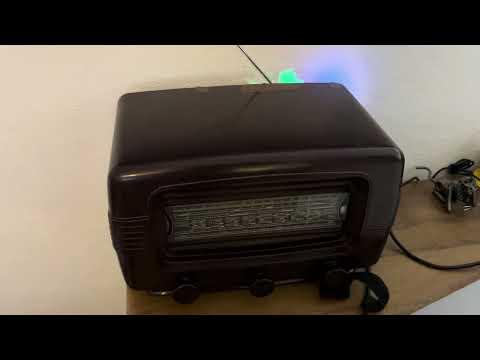

Do you love vintage electronics and maker projects? In this guide, we’ll bring a classic 1940s radio back to life by combining old-school charm with modern technology.
Using an Arduino Uno, an FM radio module, and an OLED display, we’ll turn a dusty antique radio into a working FM receiver — preserving its nostalgic look while letting it play today’s broadcasts with rich analog warmth.
Downloads
Supplies

Required Components (Amazon Associates links are used ;) )
- An Arduino Uno board
- A TEA5767 FM radio module, with its antenna
- Amplifier Module with Bluetooth / AUX input
- Latching LED pushbuttons (definitely choose some with pre-soldered cables)
- A set of colored Dupont male male wires
- A pack of resistors
- One SSD1306 OLED display
- The vintage radio was found on EBay for around 50 euros. The vendor told me it was originally from 1946
Recommended Upgrades
- Higher-quality OLED (1.3" / color)
- Pre-built FM radio breakout boards
Explanations :
The Arduino Uno is a popular microcontroller board based on the ATmega328P chip, featuring 14 digital input/output pins, 6 analog inputs, and a USB connection for programming. It operates at 5V and is compatible with a variety of sensors and actuators.
The TEA5767 is a versatile FM radio receiver IC, capable of tuning to FM radio stations in the 87.5–108 MHz range. It communicates with microcontrollers via I2C, making it ideal for projects requiring FM radio functionality. Together, the Arduino Uno and TEA5767 can be used to create custom radio receivers and audio projects.
The vintage radio I found on EBay, from the mid-20th century is a charming piece of history, encased in Bakelite with a polished, glossy finish. The design features rounded edges, the radio face includes a scale with both AM and FM frequencies.
🧠 Setup the Hardware


Connect the TEA5767: Wire the TEA5767 FM radio module to the Arduino Uno. Connect the module's SDA, SCL, and power pins to the Arduino’s corresponding pins.
I do not add here the circuit drawing. Many can be found on the internet typing "TEA5767 and Arduino Uno".
Connect the latch buttons
Add the SSD1306 OLED display
Add the Amplifier: Wire the audio output from the TEA5767 to the amplifier. Connect the amplifier to the speaker of the old radio, ensuring the power rating matches.
Power the Arduino: Use a 5V source to power the Arduino and TEA5767, such as a USB adapter or battery pack.
🔧 Upload the Arduino Code
Download the code from GitHub : LINK
The predefined FM station names and frequencies are predefined for my area (Strasbourg, France).
You will need to change the constant tables in the code, at lines 24 and 26:
Using Arduino IDE, upload the .ino file to the Arduino UNO
🚀 Wire It to the Vintage Radio


Disassemble the Radio: Carefully remove the back of the vintage radio to expose the internal components. Locate the speaker and any unused space for your new components.
Connect the two audio cables out of the amplifier to the speaker.
Use the unused space to block the Arduino Uno, the latch buttons, the amplifier and the OLED display.
Fingers crossed ... and enjoy the good old sound :)
🔥 Next Steps – Upgrade & Customize Your Vintage Radio
Now that your 1940s radio is alive again, here are a few ideas to take it even further:
🎵 1. Add Bluetooth Connectivity
Install a Bluetooth audio module so you can stream music directly from your phone while keeping the vintage look intact.
🔊 2. Upgrade the Amplifier
Replace the basic amp with a higher-quality audio amplifier for deeper bass and clearer sound.
🔋 3. Make It Portable
Add a rechargeable battery module and charging circuit to turn your restored radio into a fully portable vintage speaker.
🌈 4. Improve the Display
Upgrade to a larger or color OLED display for better visibility and a more modern contrast against the antique wood cabinet.
👉 Check the parts list above for recommended components and upgrades.
📸 Please Share Your Build!
Did you restore a vintage radio?
Did you customize it with Bluetooth, better audio, or a new display?
📷 I would love to see your version!
- Post photos of your finished build
- Share improvements or modifications
- Leave a comment with your upgrade ideas
If this guide helped you, please favorite the project and follow my profile for more Arduino, electronics, and vintage-tech builds.
And if you used the recommended parts links, thank you — it helps support future maker projects like this 🙌