4-bit Adder | OLED Display
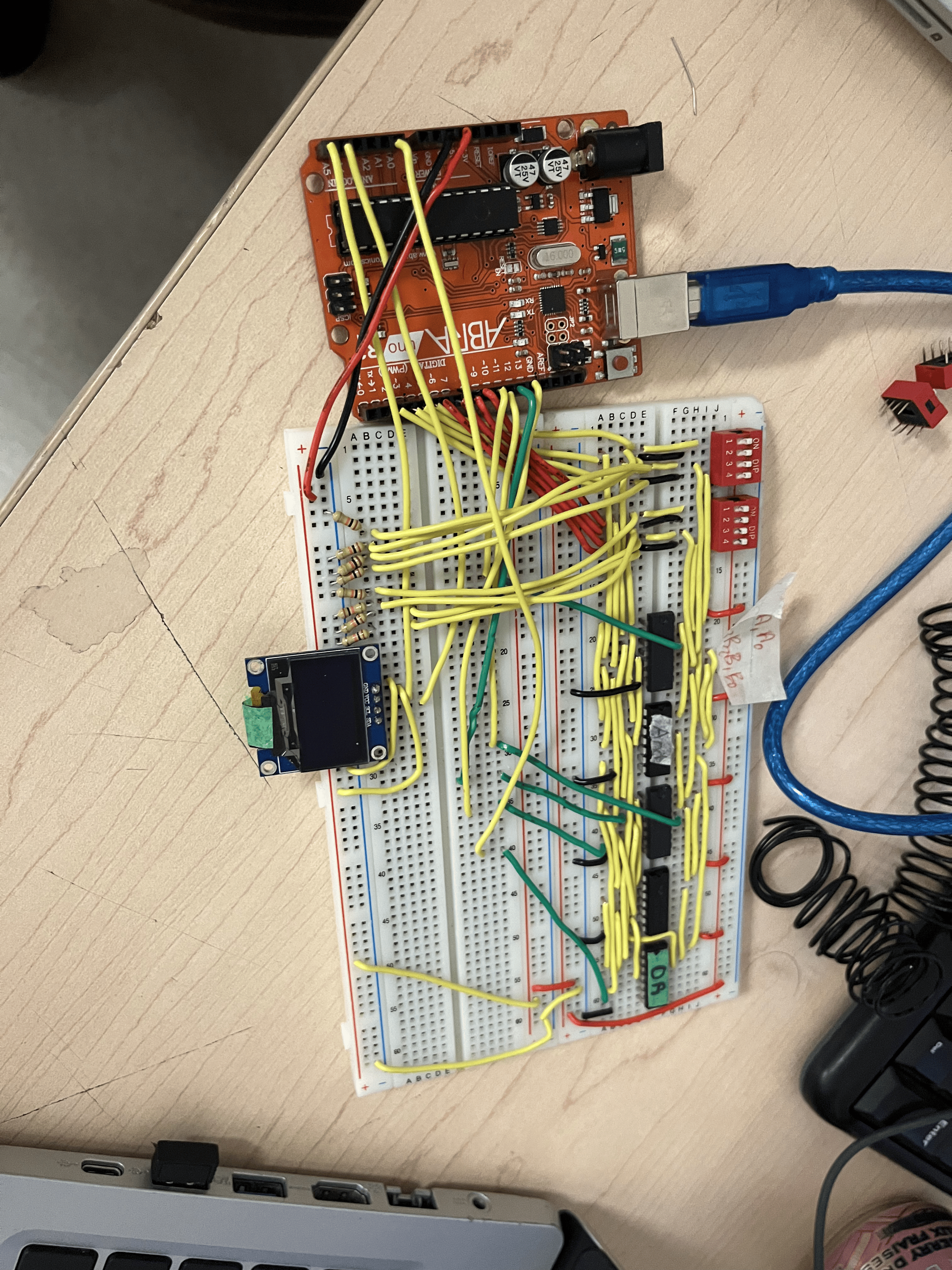
In this project, we build a 4-bit binary adder entirely from logic gates on a breadboard and then interface it with an Arduino Uno to display the result in decimal on an OLED screen.
Unlike most Arduino calculators that perform math in software, all addition is done in hardware using XOR, AND, and OR gates. The Arduino’s job is only to read the binary inputs and outputs and display the result clearly through an OLED display, just like a real calculator.
This project demonstrates:
- Digital logic design
- Binary-to-decimal conversion
- Hardware–software interfacing
- Practical debugging of floating inputs and carry bits
Supplies
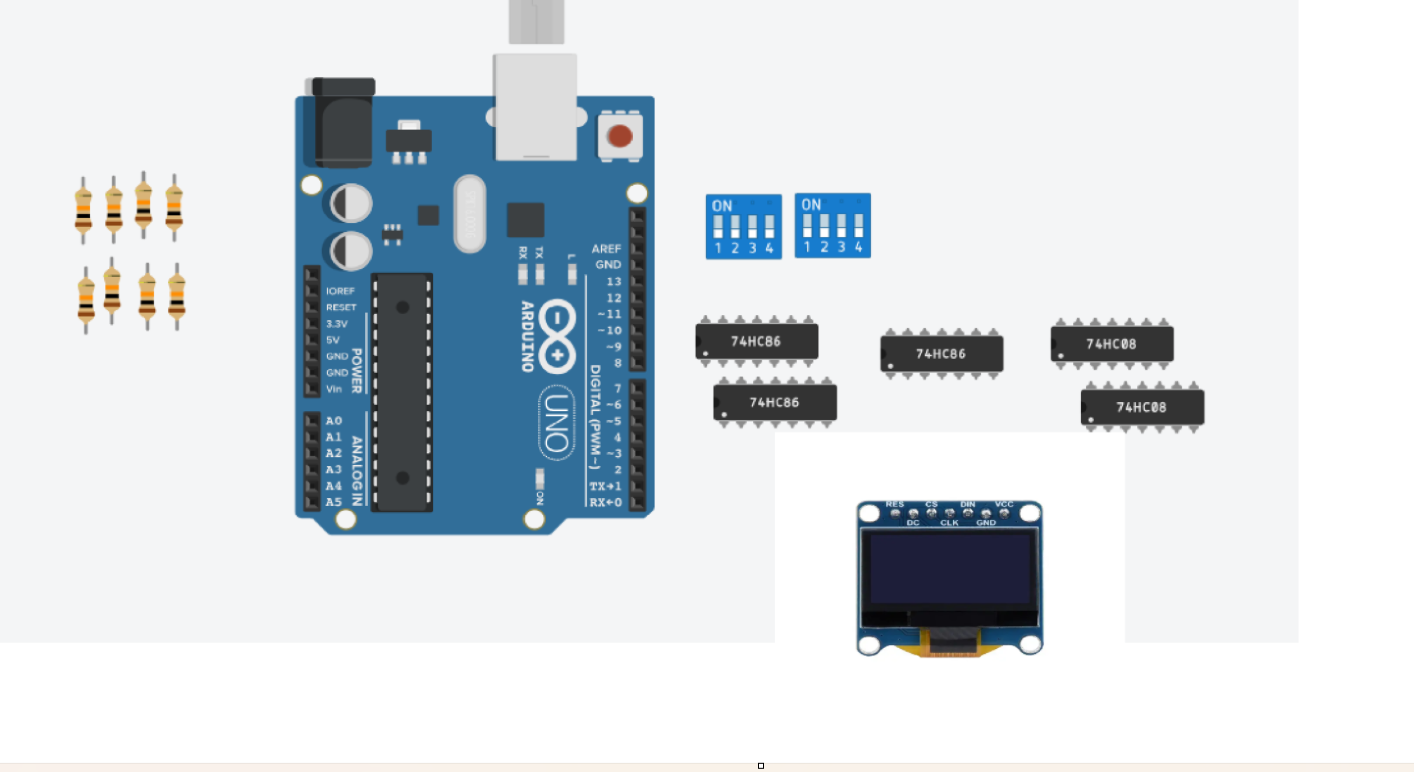
Core Components
- 1× Arduino Uno
- 2× Full-size breadboard
- 1× 0.96" OLED display (SSD1306, I2C)
Logic ICs (Adder)
To build 3 full adders and 1 half adder:
- 2× 74HC86 (Quad XOR gate)
- Each full adder needs 2 XOR
- 3 full adders = 6 XOR gates
- 1 half adder = 1 XOR Gate
- Each IC has 4 XOR → 2 chips
- 2× 74HC08 (Quad AND gate)
- Each full adder needs 2 AND
- 3 full adders = 6 AND gates
- I half adder = 1 AND GATE
- Each IC has 4 AND → 2 chips
- 1× 74HC32 (Quad OR gate)
- Each full adder needs 1 OR
- 3 full adders = 3 OR gates
- Each IC has 4 OR → 1 chip
Total logic ICs: 5
Switches (Inputs)
- 8× switches (DIP or slide)
- 4 for Number A
- 4 for Number B
Resistors
Pull-Down Resistors (VERY IMPORTANT)
- 8× 10kΩ resistors
- One for each input bit
Optional Debug LEDs
- 5× 330Ω resistors
- 5× LEDs
- (S0–S3 + Carry)
Wiring
- ~30–40 jumper wires
- Inputs → gates
- Gates → gates
- Outputs → Arduino
- Power & ground rails
Power
- 1× USB cable (Arduino → computer)
Theory - How a 4-bit Adder Works

A 4-bit adder adds two binary numbers, each 4 bits long:
Half Adder
A half adder adds two bits with no carry-in.
- Sum = A ⊕ B
- Carry = A · B
Because the least significant bit (LSB) has no incoming carry, it only needs a half adder.
Full Adder
A full adder adds:
- Bit A
- Bit B
- Carry-in from the previous stage
Equations:
- Sum = A ⊕ B ⊕ Cin
- Carry = (A · B) + (Cin · (A ⊕ B))
Each full adder is built using:
- 2 XOR gates
- 2 AND gates
- 1 OR gate
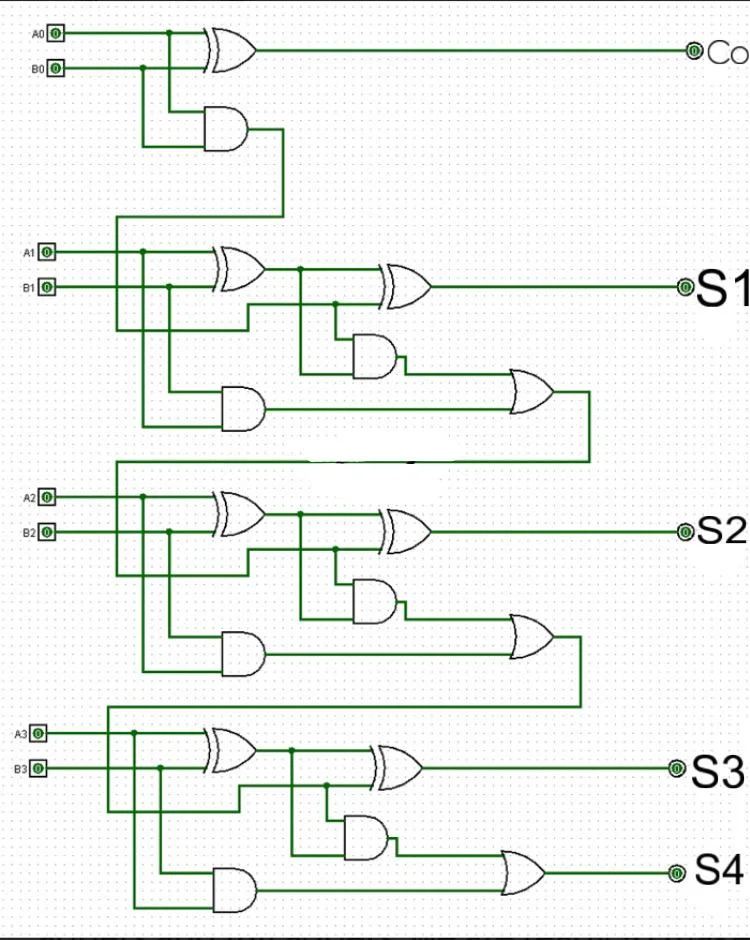
Ripple-Carry Structure
A 4-bit adder is built using:
- 1 Half Adder (bit 0)
- 3 Full Adders (bits 1, 2, 3)
The carry “ripples” from the LSB to the MSB:
Build the 4-Bit Adder on a Breadboard
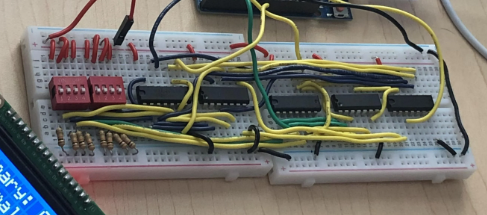
2.1 Power the Breadboard
- Connect 5V from the Arduino to the breadboard power rail
- Connect GND from the Arduino to the ground rail
- Power all ICs from these rails
2.2 Build the Half Adder (Bit 0)
- Inputs: A0 and B0
- Use:
- 1 XOR gate → Sum S0
- 1 AND gate → Carry C1
Test:
- 0 + 0 → Sum 0, Carry 0
- 1 + 1 → Sum 0, Carry 1
2.3 Build the Full Adders (Bits 1–3)
Each full adder:
- XOR A and B
- XOR result with Carry-In → Sum
- AND A and B
- AND Carry-In and (A ⊕ B)
- OR the two AND results → Carry-Out
Repeat this for:
- Bit 1 → produces S1 and C2
- Bit 2 → produces S2 and C3
- Bit 3 → produces S3 and COUT
2.4 Verify the Hardware Adder
Before using the Arduino:
- Test combinations like:
- 3 + 5 = 8
- 7 + 7 = 14
- 8 + 8 = 16
- Use LEDs if needed to check outputs
Connect Inputs to Arduino (Number a and B)

Each input bit is connected to a digital input pin.
Number A
Bit Arduino Pin
A0 - D2
A1 - D3
A2 - D4
A3 - D5
Number B
Bit Arduino Pin
B0 - D6
B1 - D7
B2 - D8
B3 - D9
Important:
Each input must use a 10kΩ pull-down resistor to prevent floating values.
Downloads
Connect Adder Outputs to Arduino
Adder Output Arduino Pin
S0 - D10
S1 - D11
S2 - D12
S3 - D13
COUT - A5
These pins allow the Arduino to read the actual hardware result.
Connect the OLED Display
OLED uses I2C communication:
OLED Pin Arduino Pin
VCC - 5V
GND - GND
SDA - A4
SCL - A5
Install libraries:
Adafruit_GFX
Adafruit_SSD1306
Arduino Logic (What the Code Does)
The Arduino:
- Reads A and B input bits
- Converts them from binary to decimal
- Reads the sum from the hardware adder
- Displays results on the OLED
- Prints values to Serial Monitor (for debugging)
The Arduino does NOT perform addition.
Downloads
Displaying the Result
OLED format:
Example:
This mimics a real calculator using pure hardware math.
Common Mistakes, Limitations, and Debugging Notes
1. Floating Bits (Unexpected +8 or +16 in the Output)
One of the most common behaviors observed is an unexpected extra value of 8 or 16 appearing in the displayed sum.
Why this happens:
- The 4-bit adder itself performs addition correctly.
- The issue occurs after the addition, during Arduino input reading and display.
- This is caused by a floating input pin, typically the carry-out (COUT) line.
- In some configurations, the carry-out must be connected to A0, which is primarily an analog pin, not a true digital input.
Because analog pins can float when used as digital inputs, the Arduino may occasionally read:
- A false HIGH → resulting in +8 or +16 being displayed
Important clarification:
This is not an arithmetic error.
The hardware adder’s logic is still correct only the displayed value is affected.
2. Why This Is Not a Design Flaw
This behavior is an inevitable limitation when:
- Using a limited number of Arduino Uno pins
- Interfacing external logic hardware with a microcontroller
- Repurposing analog pins as digital inputs
With more I/O pins or dedicated buffering hardware, this could be eliminated. However, within the constraints of the Arduino Uno, this behavior is expected and manageable.
3. How the Issue Is Managed
In practice, the floating behavior:
- Appears infrequently
- Can often be resolved by:
- Resetting the Arduino
- Reseating jumper wires
- Allowing the inputs to stabilize for a moment
This is a practical engineering workaround, not a theoretical failure.
4. Other Common Mistakes
Floating Input Switches
- Missing pull-down resistors can cause random input values.
- Always use 10kΩ pull-down resistors on all input bits.
Carry Chain Errors
- Incorrect wiring between carry-out and carry-in causes incorrect results near 8 or 16.
- Double-check carry propagation between adders.
Pin Naming Conflicts
- Avoid using reserved Arduino names like A0, B0.
- Use custom names (a0Pin, b0Pin) to prevent compilation errors.
Final Result
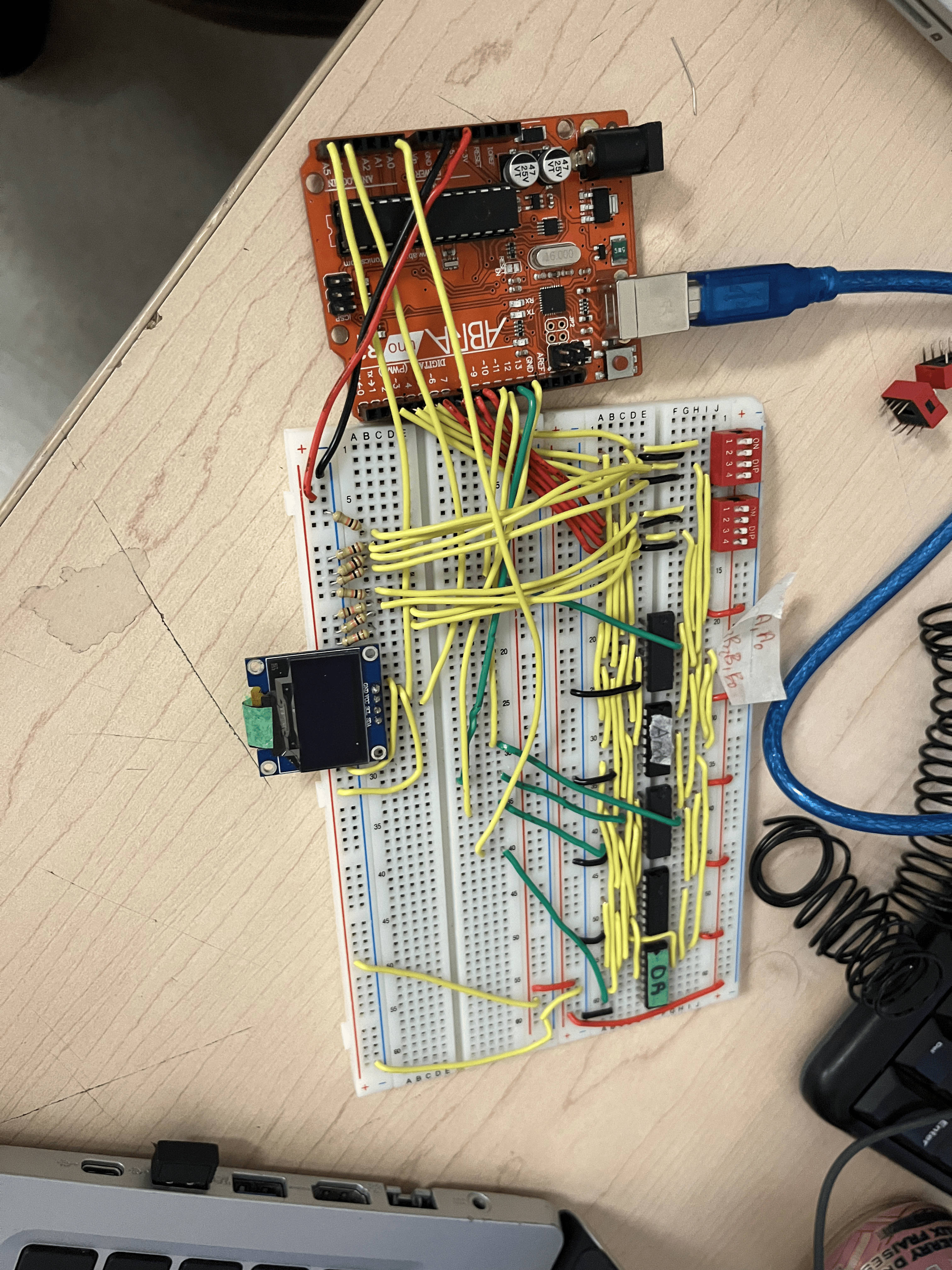
You now have:
- A pure logic-gate 4-bit adder
- Arduino used as a binary decoder
- OLED calculator-style display
- A professional digital systems project
Conclusion
This project combines digital logic theory with embedded systems, proving that real arithmetic can be done entirely in hardware and simply interpreted by a microcontroller.
This is a high-quality engineering build, not just an Arduino sketch.